7 AI pair programmer tools compared: what actually helps engineers ship

Taran Srivastava
Senior Product Manager
An AI pair programmer saves the most time on work that repeats a pattern already in your repo, and the least on changes that span files it has never read. In a study of 26 engineers working inside a large proprietary codebase, repetitive edits came back 60% faster while complex multi-file changes came back 26% faster. That spread, not the logo on the tool, is what decides whether your team ships more.
The second thing that decides it is cost, and almost nobody writes about it.
This blog covers both: firstly, we've highlighted the seven tools in case you're just here for the best tool; read on to know how the loop actually works, what each kind of task really gains, why your speedup feels larger than it measures, and what the bill looks like at team scale.
Seven AI pair programmer tools, compared
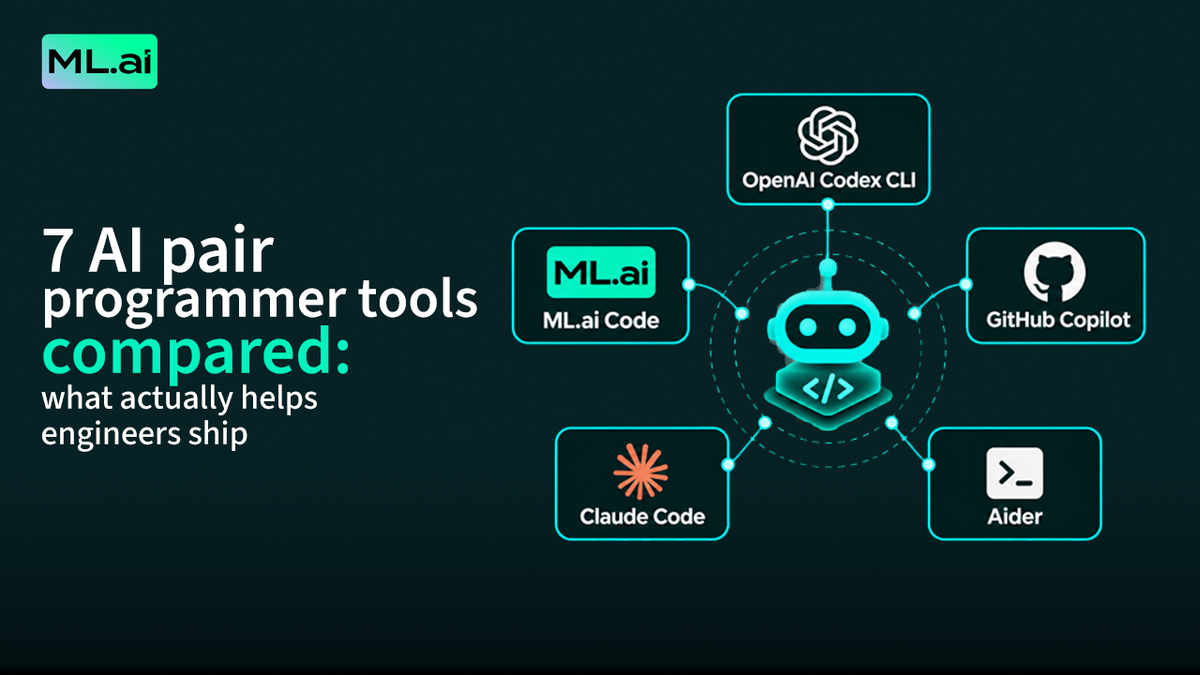
If you're here just for the AI pair programmer tools, you can find them below, and they're chosen to cover the real shapes of the category: an editor extension, an editor fork, terminal agents, and open-source options you can point at your own key. Ranked by how well they hold the two axes that decide outcomes: retrieval quality and cost per completed task.
| Tool | Shape | Strongest at | Watch for | Cost model |
|---|---|---|---|---|
| ML.ai Code | VS Code and Cursor extension, engine bundled | Per-step model routing, four scoped subagents, diff-before-write on every change | macOS Apple Silicon and Windows x64 only; no Linux, Intel Mac or Windows ARM64 | Flat plan plus usage past an included allowance |
| GitHub Copilot | Extension across most major IDEs | Inline completion volume, GitHub-native review and PR flows | Historically weaker whole-repo retrieval than editor forks | Seat price plus metered credits for agent and premium models |
| Cursor | VS Code fork | Whole-codebase context, multi-file edits, tab completion | Fork means your extension and shortcut setup travels imperfectly | Subscription with usage pools that power users exhaust |
| Claude Code | Terminal-first agent | Long multi-step work, deep repository reasoning | The highest token consumption in the category at team scale | Subscription tiers plus API overflow |
| OpenAI Codex CLI | Terminal agent, open source | Sandboxed local execution, scriptable in CI | Terminal-native, so no diff-review surface inside the editor | Bundled with a ChatGPT plan, or API rates |
| Aider | Terminal, open source | Repo map retrieval, one git commit per change | You supply and manage the key, the model, and the budget | Free tool, you pay the model provider directly |
| Cline | VS Code extension, open source | Explicit plan and act separation, MCP tool wiring | Cost control is entirely on you | Free tool, you pay the model provider directly |
1. ML.ai Code
What it does: reads your repository, hands each step of a task to a focused agent, and picks the most cost-efficient model that clears your quality bar for that step. Four subagents are addressable with @: Explore searches and explains and changes nothing; General carries out well-defined work in one self-contained turn; Architect returns the order of work and the trade-offs; Plan writes the finished plan to a markdown file for review. Only General can modify code.
What you get: the split between reading and writing is enforced rather than requested, so an investigation cannot quietly become a refactor. The published routing breakdown puts a 39% cut in cost per completed task on the same output. Build and Plan modes back this at the tool level: in Plan, the edit and write tools are denied rather than discouraged, while test runners and typecheckers are still allowed, because verification is exactly what planning needs.
The control surface is the part worth evaluating closely. Every side-effecting operation stops at one gate with Allow, Always, or Deny, and supported edits open a native diff before the permission is answered.
The command safety classifier does not pattern-match shell strings. It lexes and parses the command, walks every executable position and takes the worst verdict, so curl url passes while curl -o ~/.zshrc url does not, and wrappers like sudo, xargs, and timeout cannot hide a dangerous command inside an innocent one. Terminal streaming, session sharing, and engine self-upgrade are blocked at the network layer rather than left reachable.
Where it constrains you: macOS on Apple Silicon or Windows on x64. Linux, Intel Macs, Windows ARM64, and browser-hosted VS Code are not in this release. There is no price meter because the engine route that would supply billing data is not reliable, and the team declined to publish an estimate as fact. If those are dealbreakers, say so before you pilot.
Best fit: an AI engineering team whose model spend is outgrowing its headcount and which needs cost per completed task to fall without a quality regression it will discover later. Start with the ML.ai Code install and a read-only question that changes nothing.
2. GitHub Copilot
What it does: inline completions, chat, and an agent mode, across most major IDEs, wired into GitHub's own review and pull request surfaces.
The payoff: the largest completion footprint in the category and the shortest path from suggestion to merged PR if your team already lives in GitHub. The 4,867-developer trials that produced the 26% figure ran on this tool, so its measured floor is better documented than any competitor's.
Watch for: retrieval scope. In the hands-on comparison cited earlier, it repeatedly confined itself to open files even when instructed to consider the whole workspace, and produced the minimum viable change where a broader fix was correct. Verify the current behavior on your own repo before assuming that has been resolved. Agent mode and premium models now bill through metered credits, which changes the budgeting question from seats to consumption.
3. Cursor
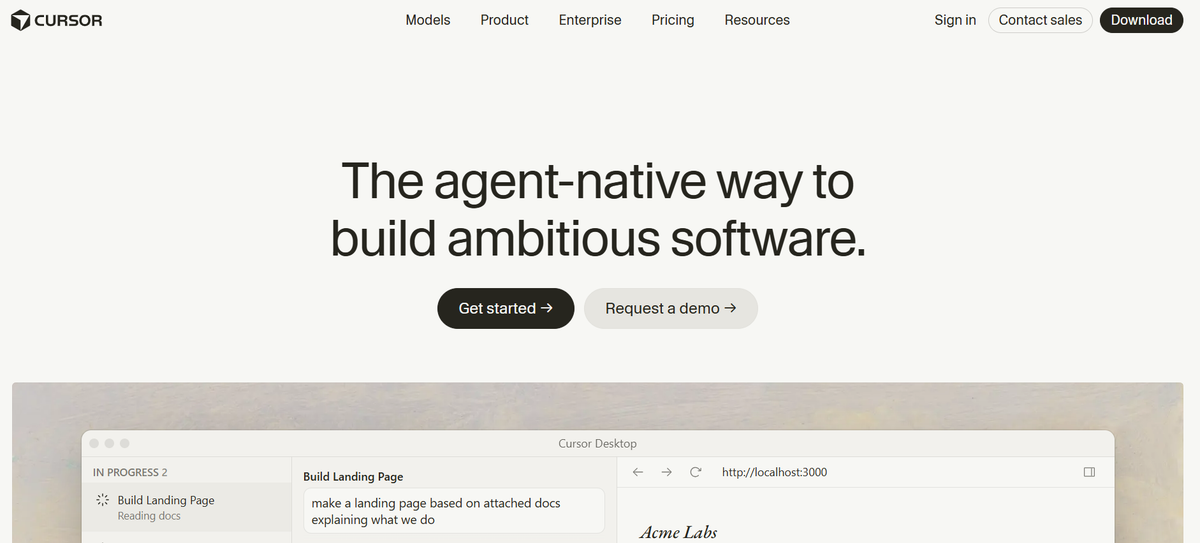
What it does: ships a fork of VS Code with codebase-wide retrieval and multi-file editing built into the editor rather than bolted on.
The payoff: the strongest whole-repo context in mainstream editor tools, which maps directly to the failure mode the Cisco study identified. In Farcic's comparison, it found related changes in files that were not open, matched the existing test patterns in the repository, and removed a feature flag that a narrower tool left behind as debt.
Watch for: it is a fork, so your extension set, keybindings, and organizational IDE policy all need checking. Consumption pricing means heavy agent users land well above the headline plan price.
4. Claude Code
What it does: runs as a terminal-first agent that reads, plans, edits, and executes across long multi-step tasks.
The payoff: the deepest sustained agentic work in the category, and the most convincing results on genuinely large refactors. Roughly 4% of GitHub commits are now authored by it, according to figures cited in METR's research.
Watch for: cost, unambiguously. Both public enterprise blowouts documented above involved this tool at scale. It is not that the tool is wasteful relative to what it does; it is that capability and token consumption move together, and the billing model has no ceiling. If you deploy it, deploy per-engineer caps on day one rather than after the first quarterly review.
5. OpenAI Codex CLI
The shape: an open-source terminal agent that executes in a local sandbox and scripts cleanly into CI.
The payoff: headless and scheduled workflows, the gap most editor-bound tools leave. Sandboxed execution gives a defensible answer to the security review question about what an agent is allowed to run.
The catch: being terminal-native means there is no in-editor diff review surface. Your approval flow becomes a terminal prompt, which is a real downgrade in reviewability for edits touching many files at once.
6. Aider
The shape: open-source pair programming in the terminal, building a repo map to decide what enters context and committing each change to git separately.
What you get: two things the commercial tools mostly do not. First, a git commit per change, which makes every AI edit independently revertable without a bespoke revert mechanism. Second, complete transparency into which model you are calling and what it costs, because you bring the key.
The catch: you own the budget, the model choice, and the upgrade path. Freedom if you have an engineer who wants that job, a liability if you do not.
7. Cline
The shape: an open-source VS Code extension with an explicit separation between planning and acting, plus MCP wiring for external tools.
What you get: the plan-and-act split enforced in the interface, which is the same idea behind Plan mode elsewhere and the right default for anyone nervous about an agent editing before it has been understood. Bring-your-own-key means no markup on inference.
The catch: no cost governance layer at all. Every guardrail is one you build.
What is an AI pair programmer, and what changed in 2026?
An AI pair programmer is a coding assistant that works alongside you on the same code in real time, taking either the driver seat (writing) or the navigator seat (reviewing and questioning), as IBM defines it. The metaphor comes from human pair programming, where two engineers share one problem and trade roles.
The term now covers three quite different things, and conflating them is the most common reason teams pick badly.
The completion layer
Inline suggestions that finish the line or block you are typing. Inline suggestions are what GitHub Copilot launched as, and writing new code remains the single most common AI use case among developers, cited by 71% in DORA's 2025 survey. It is cheap, low-risk, and reversible with one keystroke.
The chat layer
A panel that answers questions about the code in front of you. Useful for onboarding into an unfamiliar repository and for explaining a function you did not write. It reads; it does not act.
The agent layer
This is what shifted. An agentic coding tool takes a goal in plain English, decides which files to read, plans a sequence, writes a patch, runs your test suite, reads the failures, and tries again. It holds a context window (the fixed budget of text a model can consider at once) and runs inside a scaffold, sometimes called a harness: the prompts, tools, and control logic that turn a language model into something that can take actions.
The agent layer is where the productivity is, and it is also where the money goes. A single agent run on a real GitHub issue averages around 77,700 tokens of model calls using a standard scaffold. Multiply that by a team and a working week, and you have the reason engineering leaders started reading their AI invoices closely in 2026.
Adoption is essentially universal. Google's 2025 DORA report, drawing on nearly 5,000 technology professionals, found 90% using AI at work with a median of two hours a day. Stack Overflow's 2025 survey of 49,009 developers put usage or planned usage at 84%. The open question is no longer whether to adopt one. It is which parts of your work it repays, and at what price.
How does an AI pair programmer actually work?
Every task an agentic AI pair programmer takes on runs through the same five stages. Understanding them is the difference between choosing a tool for marketing copy and choosing one for mechanism.
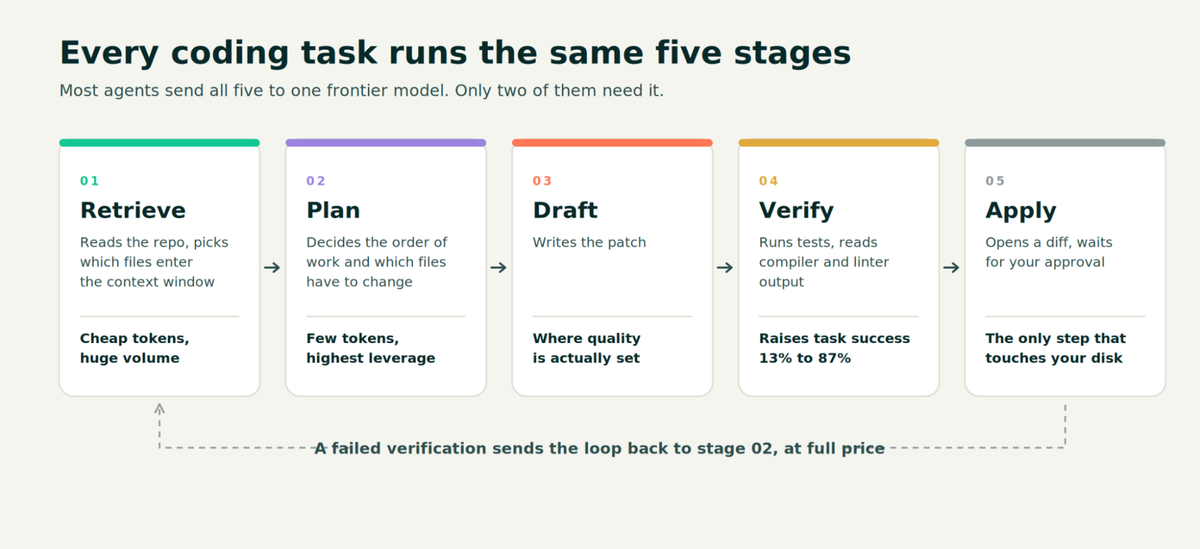
Every coding task runs through the same five stages. Most agents send all five to the same frontier model, which is where the bill comes from.
Retrieval decides the ceiling
Stage one picks which files enter the context window. Nothing downstream can beat this choice: a model cannot fix a bug in a file it never read.
Farcic tested exactly this. In a side-by-side test published in March 2025, Viktor Farcic of the DevOps Toolkit channel asked two tools the same question about a Go repository, explicitly instructing both to evaluate the whole workspace. One traced the change through main.go and route.go. The other confined itself to the file that happened to be open in the editor and missed the rest.
His summary of the weaker result was blunt: "If a person did what Copilot did, I would reject their PR." He added the principle that matters here: "working with code is rarely limited to a single file, and the ability to understand and work on the whole code base is critical."
Retrieval also drives cost. It is the cheapest tokens per call and the largest volume, which makes it the single worst place to spend frontier-model rates.
The scaffold does more work than the model
Princeton's Holistic Agent Leaderboard, which ran 21,730 agent rollouts across nine models and nine benchmarks at a cost of roughly $40,000, found that the choice of scaffold moves accuracy and cost as hard as the choice of model. On one web benchmark, two scaffolds separated by two percentage points of accuracy differed by 9x in cost. On the coding benchmark, a task-specific scaffold beat a generalist one in 11 of 12 model comparisons.
The practical read: a strong model in a weak scaffold loses to a mid-tier model in a good one. When you evaluate an AI pair programmer, you are evaluating a scaffold, not a model.
Verification is the multiplier nobody markets
The same Princeton work analyzed 1,634 agent transcripts and found that when an agent took explicit action to check its own output, by writing a unit test or cross-referencing a result, it was 13% to 87% more likely to succeed on that task. When an agent recovered from a failed tool call mid-run rather than repeating it, it was 1.5x to 4x more likely to finish.
That is a large, free gain that depends entirely on whether the tool closes the loop. An agent that writes a patch and stops has skipped the highest-yield step in the sequence. One that runs your tests, reads the compiler output, and revises has not.
The permission gate is where trust is won or lost
Stage five is the only one that touches your disk. A well-built AI pair programmer suspends the write, computes the change, opens a native diff, and waits. ML.ai Code measured 16 milliseconds between a developer clicking Allow and the file actually changing, which is what makes approve-before-edit a real gate rather than a cosmetic one: the window exists, and it is used to render a diff you can read.
The failure mode to watch for is a saved rule. Choosing "Always" on a permission prompt writes a rule that outlives the session, and in a folder that is not a git repository, some engines scope that rule globally. One click can silence prompts in every non-git folder you open afterward. Tools that surface saved rules in a revocable list are protecting you from a problem whose only other symptom is approvals quietly not appearing.
Which parts of your work does an AI pair programmer actually speed up?
The honest answer is a distribution, not a number. The most useful measurement comes from four Cisco engineers who ran 15 defined software tasks across 26 developers on real proprietary codebases, logging efficiency change per task rather than asking people how they felt.
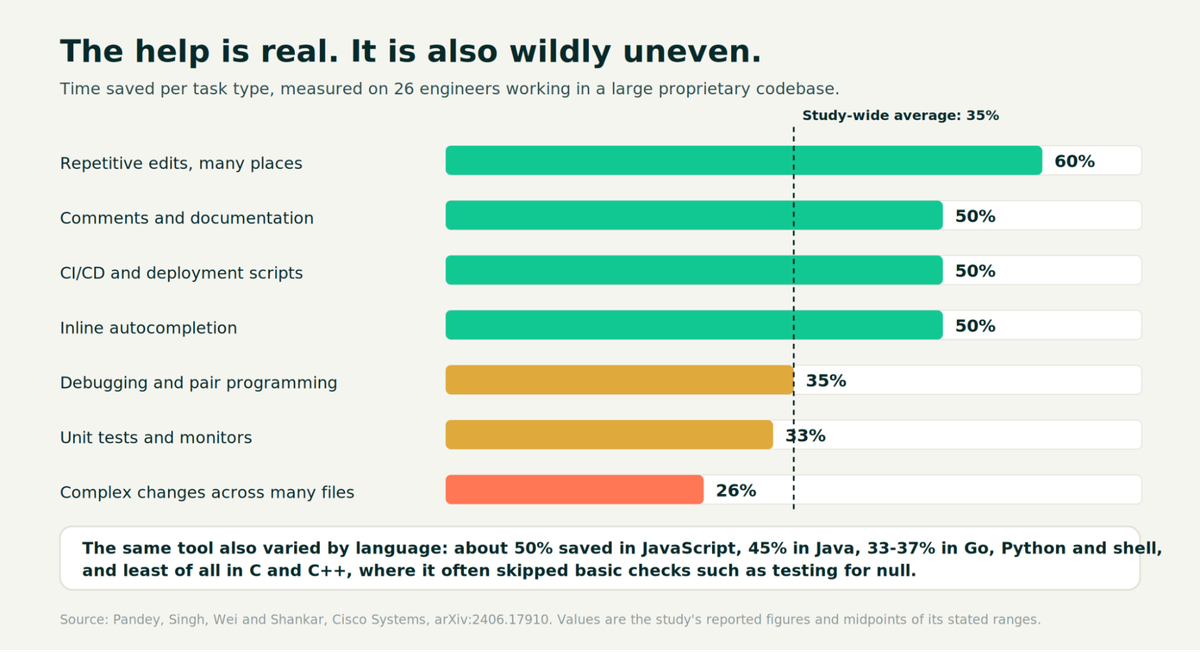
The help is real and wildly uneven. The study-wide average of 35% hides a range from 60% down to 26%.
Where the gains concentrate
Repetitive edits repeated in many places came in around 60% faster. Comment and documentation generation, CI/CD and deployment script work, and inline autocompletion all clustered just above 50%. These share a property: the pattern already exists somewhere the model can see, and the correct output is easy to recognize.
The same study found the gain varied as much by language as by task. JavaScript work saved close to 50%, Java around 45%, Go, Python and shell scripting between 33% and 37%. C and C++ saved the least, and the researchers noted the tool there "often failed to generate useful code, including failing to include basic quality coding practices like null checking."
Where the gains collapse
Complex changes spanning many files, especially in code implementing unique business logic, came in around 26%. The researchers were specific about why: the tool could not take a single prompt and generate coordinated changes across the several files a complete task required, even when detailed prompting produced usable code for individual functions.
One failure they documented is worth keeping in mind, because it is invisible to a compiler. Asked to optimize a function, the assistant reorganized it to look simpler and made it slower, converting a conditional call to an expensive method into an unconditional one at the top of the function. Multiple prompts didn't recover the original behavior. Functionally correct, measurably worse.
What the large trials say
Two studies bracket the range.
The optimistic end: a controlled experiment with 95 professional developers asked each to implement an HTTP server in JavaScript. The group with an AI pair programmer finished 55.8% faster, with a 95% confidence interval of 21% to 89%. Read the task before you read the number. It was greenfield, single-file, in the best-performing language, with no existing codebase to understand. It is close to the theoretical maximum, not a forecast for your sprint.
The realistic end: a set of three randomized trials at Microsoft, Accenture, and a Fortune 100 manufacturer, combining 4,867 developers, measured a 26.08% increase in completed tasks (standard error 10.3%), with 13.55% more commits and 38.38% more compiles. Both this study and the 95-developer trial found the same pattern in who benefits: less experienced developers adopted faster and gained more. One review of the literature puts the split at roughly 21% to 40% gains for juniors against 7% to 16% for seniors.
The rule that follows: Point your AI pair programmer at the parts of the week that repeat, are well patterned, and are cheap to verify. Keep it in an advisory seat for architectural changes in unfamiliar proprietary code, where the measured gain is a quarter, and the failure modes are subtle. If your stack is heavy in C or C++, expect the bottom of the range and budget accordingly.
Why does the speedup feel bigger than it measures?
Because self-report and stopwatch disagree, and they disagree consistently.
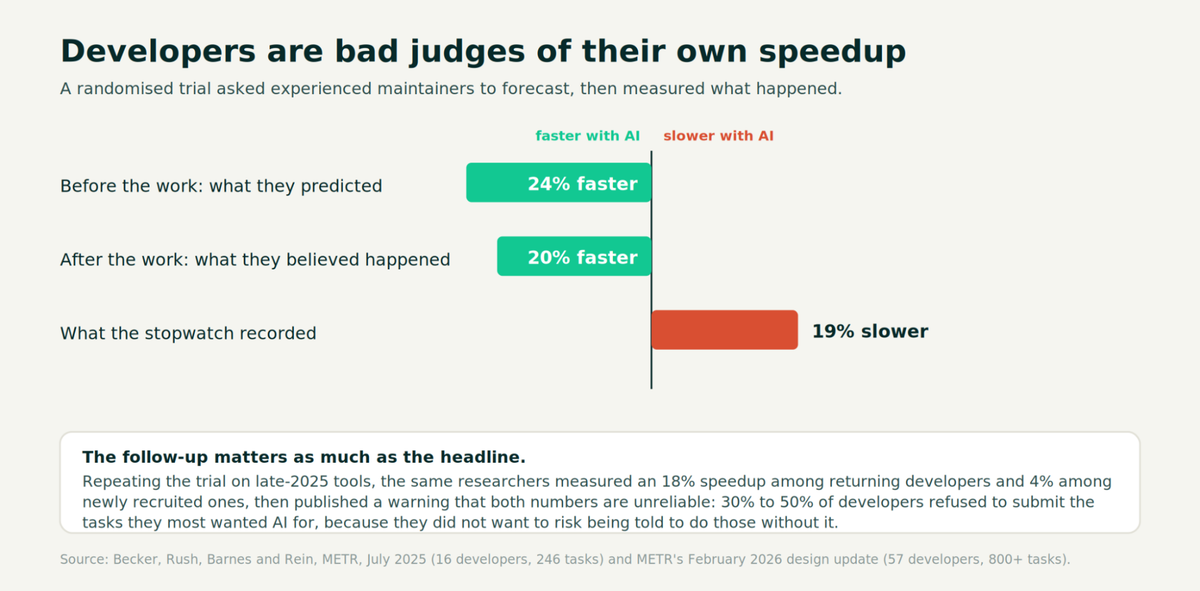
Forecast, belief, and measurement pointing in opposite directions. The follow-up study is as important as the headline.
METR ran a randomized controlled trial with 16 experienced open-source maintainers across 246 real tasks in repositories they already knew, randomizing each issue to AI-allowed or AI-disallowed. Developers forecast a 24% speedup. Afterward, they believed they had been 20% faster. The recorded times showed them 19% slower, with a confidence interval of 2% to 39%.
Read the follow-up before you use that number as a stick. In February 2026, the same team published a design update covering 57 developers, 143 repositories, and over 800 tasks. Returning developers showed an 18% speedup; newly recruited ones showed 4%.
Both estimates came with a warning that they are unreliable in a specific direction. Between 30% and 50% of developers admitted to withholding the tasks they most wanted AI for, because they did not want to risk being assigned to do them by hand. One participant put it plainly: "I avoid issues like AI can finish things in just 2 hours, but I have to spend 20 hours."
The measurement is contested. The perception gap is not.
The verification tax
DORA's 2025 analysis names the mechanism. Time saved writing code is re-spent auditing it. That is why the same report finds AI adoption correlating with higher delivery throughput and higher delivery instability at once. Speed moves; the bottleneck moves downstream into review and testing.
Stack Overflow's data shows the tax in developers' own words. The top frustration, cited by 66%, is "AI solutions that are almost right, but not quite." Another 45% say debugging AI-generated code takes longer than expected. Trust in AI accuracy fell from 43% in 2024 to 29% in 2025 even as usage climbed, and experienced developers were the most skeptical group.
The maintainability bill arrives later
GitClear's analysis of 623 million code changes between 2023 and 2026 tracks what happens to a repository after the throughput arrives. Refactoring line moves are down 70%, cross-file function calls (a proxy for reuse) down 35%, and long-term legacy maintenance down 74% against 2022 levels. Meanwhile, within-commit copy/paste is up 41%, code block duplication up 81%, and two-week churn up 15%. Their earlier report on 211 million changed lines found that 2024 was the first year on record where copy/pasted lines exceeded moved (refactored) lines.
The same firm's most honest number reconciles everything above: heavy AI users out-produce non-users by 4x to 10x, but most of that gap predated AI. Compared against their own past selves, heavy AI users gained about 25% in velocity. That figure sits comfortably inside the 26% from the 4,867-developer trials, which is a good sign that both are close to the truth.
What to do with this: Stop measuring lines shipped and start measuring merged changes that survive two weeks without revision. Every study above agrees that generation is not the bottleneck. Verification is.
What does an AI pair programmer actually cost?
More than the sticker price, and in a way that doesn't scale as software licenses do. This is the section the ranking pages skip.
Benchmarks flatter the models you are paying for
Before the money, the measurement. Most vendor pages quote SWE-bench Verified, a 500-issue set drawn from public repositories that models have very likely seen in training. Scale AI built SWE-bench Pro to remove that advantage: 1,865 tasks across 41 repositories, including 276 instances from 18 private commercial codebases that are not publicly accessible.
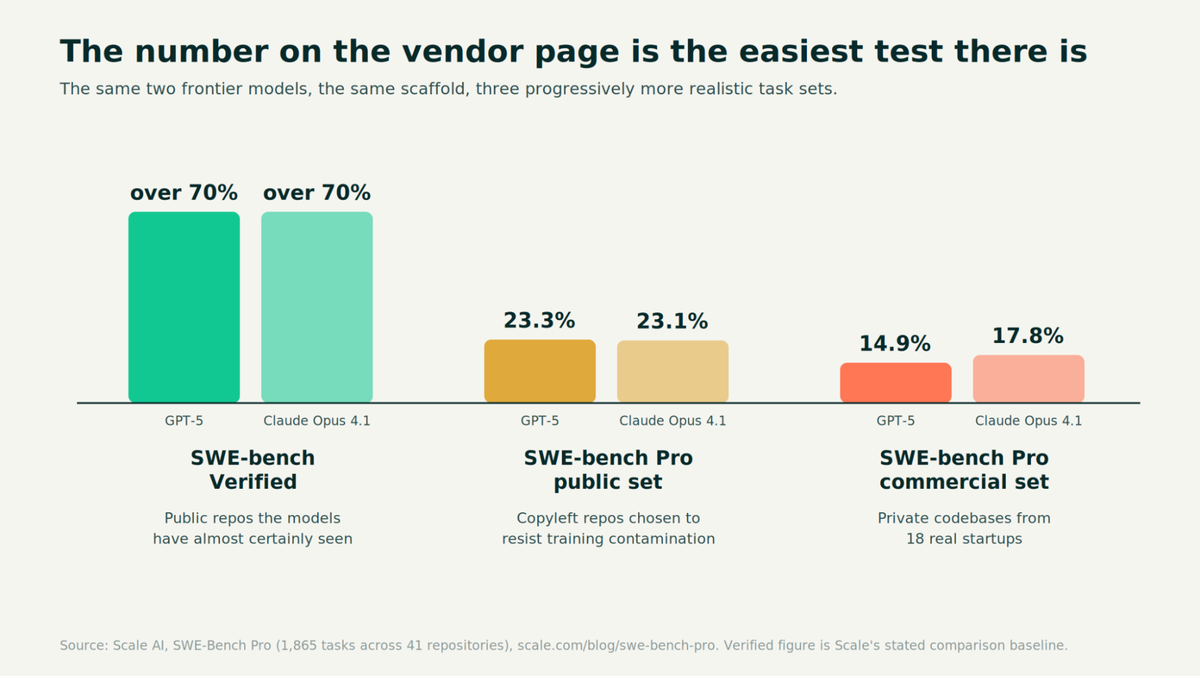
The same two models, the same scaffold, three progressively more realistic task sets.
Models scored over 70% on Verified, resolved 23.3% and 23.1% on the Pro public set. On the private commercial subset, closest to the kind of code your team actually maintains, those fell to 14.9% and 17.8%. Treat any headline benchmark number as an upper bound measured on the easiest available material.
The same score at seven times the price
Now the money. Princeton's leaderboard reports accuracy and dollar cost for every run, which almost no leaderboard does. On SWE-bench Verified Mini under an identical scaffold, four configurations landed on the same score.
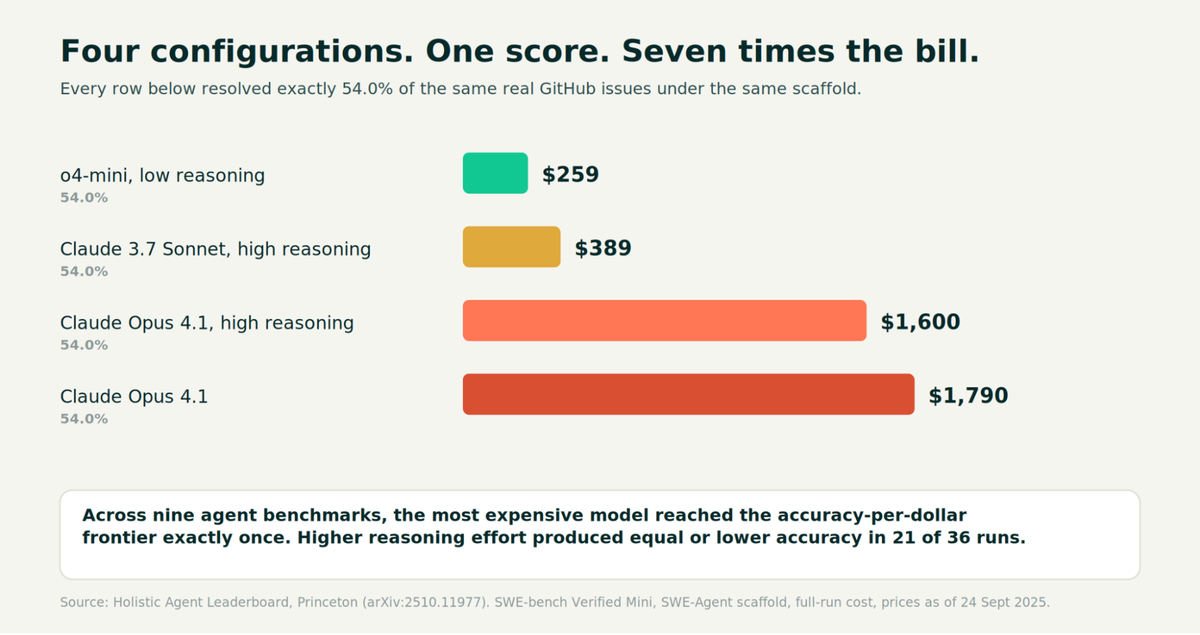
Four configurations, one score, a 6.9x spread in what it cost to get there.
Across all nine benchmarks in that study, the most expensive model reached the accuracy-per-dollar frontier exactly once. Fewer than a third of tested models sat on the frontier for any given benchmark. And in 21 of 36 tested combinations, turning reasoning effort up produced equal or lower accuracy.
Three conclusions follow, and they are unusually actionable:
What this looks like on a real invoice
Uber rolled an agentic coding tool out to roughly 5,000 engineers in December 2025. Adoption went from 32% in February to 84% classified as agentic users by March. By spring, around 70% of committed code originated from AI tools and about 11% of live backend updates were written by agents with no human in the loop.
The company's CTO confirmed to The Information that Uber had burned its entire 2026 AI budget by April, four months in. Per-engineer costs were reported between $500 and $2,000 a month.
Microsoft's Experiences and Devices division, which ships Windows, Microsoft 365, Outlook, Teams and Surface, wound most of an internal agentic coding pilot down by 30 June 2026 after token billing consumed the division's annual AI allocation in months.
Neither case is incompetence at an unusually careless company. A study of 372 enterprises found only 15% forecast AI costs within 10% of actual, and nearly one in four missed by more than 50%. Consumption pricing has no ceiling, and a more capable agent is by construction a more expensive one: it reads more files, runs more commands and retries more often.
The one metric to adopt
Not tokens. Not seat count. Cost per completed task, measured against your own acceptance tests.
That metric is what makes per-step routing legible. The four stages of a task do not need the same model. Classifying an intent and extracting fields are recognition problems that small models handle at parity. Drafting a change and verifying it against your evals are where quality is genuinely set.
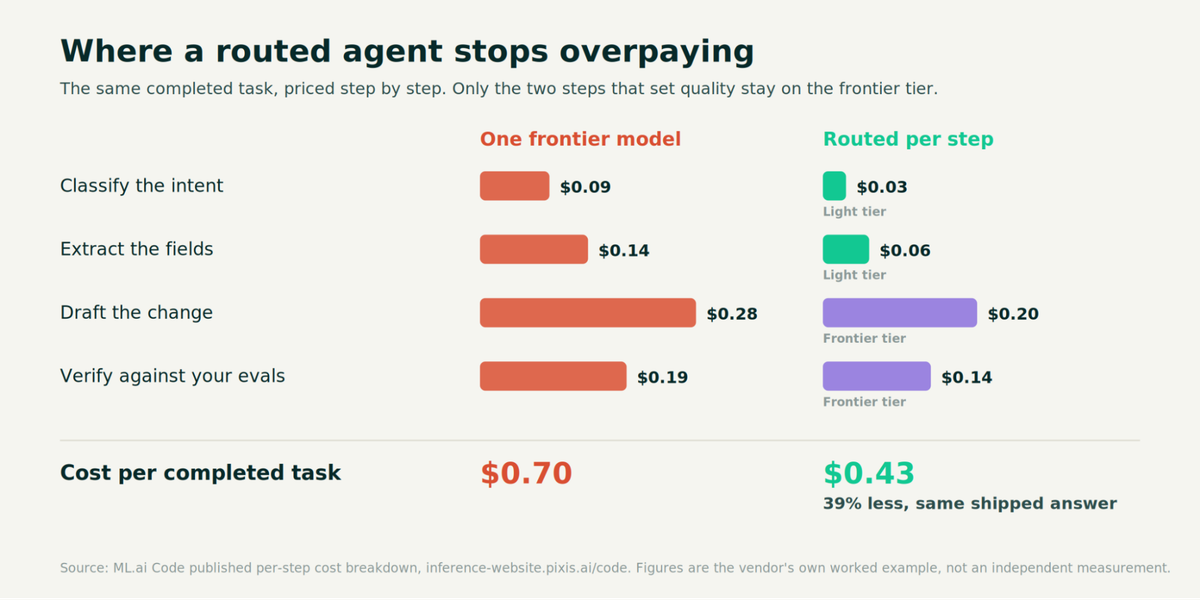
The same completed task, priced step by step. Only the two stages that set quality stay on the frontier tier.
We published this breakdown for our own routing: $0.70 per completed task when every step goes to a frontier model, against $0.43 when each step is routed to the cheapest model that clears the quality bar. A 39% reduction on the same shipped answer.
Our own SWE-bench Verified testing, run on a 50-instance slice of the public set using the official evaluation harness with gold-patch verification, put the routed agent at 86% against 58% for a single-shot frontier model with no retries and no verification loop. That gap restates the Princeton finding: the loop matters more than the model.
If your AI coding spend is growing faster than your headcount, the fix is not a cheaper model applied everywhere. It is a model routing policy applied per step, with your own evaluations acting as the acceptance gate. That is what the ML.ai Code overview sets out in detail, and what a 30-day routing pilot measures on your own traffic before anything changes in production.
How should you choose?
Three questions, in this order. They matter more than any feature table.
What does your week actually consist of?
Pull twenty tickets from your last sprint and sort them into the buckets in the chart above. If most land in repetitive edits, documentation, tests, and CI work, almost any competent tool in this list will pay for itself, and you should optimize for cost and control. If most land in multi-file changes to proprietary business logic, retrieval quality is the only feature that matters, and you should test candidates on your own repository before signing anything.
Where does your review capacity sit?
The verification tax is real, and it lands on your senior engineers. If your review queue is already the constraint, a tool that generates more code faster will make your delivery worse, exactly as DORA's instability finding predicts. Prioritize tools that verify their own work, open a diff before writing, and separate read-only agents from ones that can change code.
You get: fewer patches reaching a human reviewer in a state that wastes their time.
What happens to the bill at 10x usage?
Run the arithmetic before the pilot, not after. Take your expected tasks per engineer per week, multiply by a realistic cost per completed task, and multiply by headcount. If that number frightens you, the answer is per-step routing and hard caps, not a cheaper model everywhere.
You get: a spend curve that tracks output instead of enthusiasm.
Conclusion
You now have the distribution rather than the average: 60% on repetitive work, 26% on multi-file changes in unfamiliar code, and a perception gap that consistently overstates both. You have the mechanism that determines which end you land on: retrieval quality and whether the tool verifies its own output. And you have the cost picture that no page ranking for this term publishes, including four configurations that scored identically but differed by 6.9x in price.
The first step is small. Pull twenty tickets, sort them into the task types above, and see which half of the chart your week actually lives in. That tells you whether to optimize for retrieval or for cost.
If it turns out to be cost, that is the problem ML.ai Code was built for: the same shipped answer, routed per step, with a diff before anything touches your disk. A 30-day routing pilot runs against one of your own workloads in shadow first, so the number you decide on is measured on your code rather than someone else's benchmark.
Frequently Asked Questions
What is the difference between an AI pair programmer and vibe coding?
An AI pair programmer keeps a human in the review seat for every change; vibe coding describes accepting AI output largely without reading it. The distinction shows up in the data: 66% of developers report AI output that is "almost right, but not quite," which is precisely the class of error that survives a skim and fails in production.
Who drives the code in AI pair programming?
You do, on anything that reaches your main branch. The useful pattern is to let the AI drive on well-patterned work you can verify quickly, and to take the keyboard back for architectural changes. Tools that gate every write behind explicit approval and show a diff first enforce this rather than relying on your discipline.
Are AI pair programmers worth it for senior engineers?
Less than for juniors, on current evidence. Studies consistently find larger gains for less experienced developers, with one review putting the split at roughly 21% to 40% for juniors against 7% to 16% for seniors. Seniors also spend more time reviewing AI output. The payoff for a senior is usually in scaffolding, test generation, and unfamiliar-codebase onboarding rather than in core implementation.
Is there a free AI pair programmer?
Yes. Aider and Cline are open source and free as tools; you pay your model provider directly. Several commercial products also run a free tier or trial. Free at the tool layer is not free overall, because inference is the actual cost, which is why cost per completed task is the number to track rather than license price.
Does an AI pair programmer make code quality worse?
It correlates with maintainability moving in the wrong direction. Across 623 million code changes, refactoring moves fell 70% while code duplication rose 81% and two-week churn rose 15%. None of this is inevitable. It is what happens when generation speeds up, and review capacity does not, which is a process problem before it is a tool problem.
How much does an AI pair programmer cost per developer per month?
Published subscription tiers commonly run $10 to $200, but heavy agentic users at large companies have been reported between $500 and $2,000 per engineer per month once token consumption is counted. Only 15% of enterprises forecast their AI costs within 10% of actual. Set per-engineer caps before rollout, not after.
Written by
Taran Srivastava
Senior Product Manager