
Best LLM Routers In 2026: How to Pick One For Production

Taran Srivastava
Senior Product Manager
Pick an LLM router by how it behaves on traffic it has never seen, not by the saving on its landing page. One number says why. When four learned routers were moved from the coding tasks they were calibrated on to unseen agentic repository work, their solve rates fell from 46 to 47 percent down to a range of 8.9 to 21.4 percent.
Random model selection scored 31.25 percent on the same 176 tasks. Four routers, all beaten by a coin toss, on the exact workload most engineering teams are trying to make cheaper.
That result comes from CodeRouterBench, published in June 2026. It is the reason this blog leads with selection criteria and only then gets to the list. Below: the seven things that separate a production router from a demo, seven routers ranked by the workload each one genuinely fits, and how you can decide which one is best for you.
The best LLM routers in 2026
These are the best llm routers in 2026, by what each one is actually best at.
1. ML.ai Code: best for agentic coding, because the decision lives inside the harness
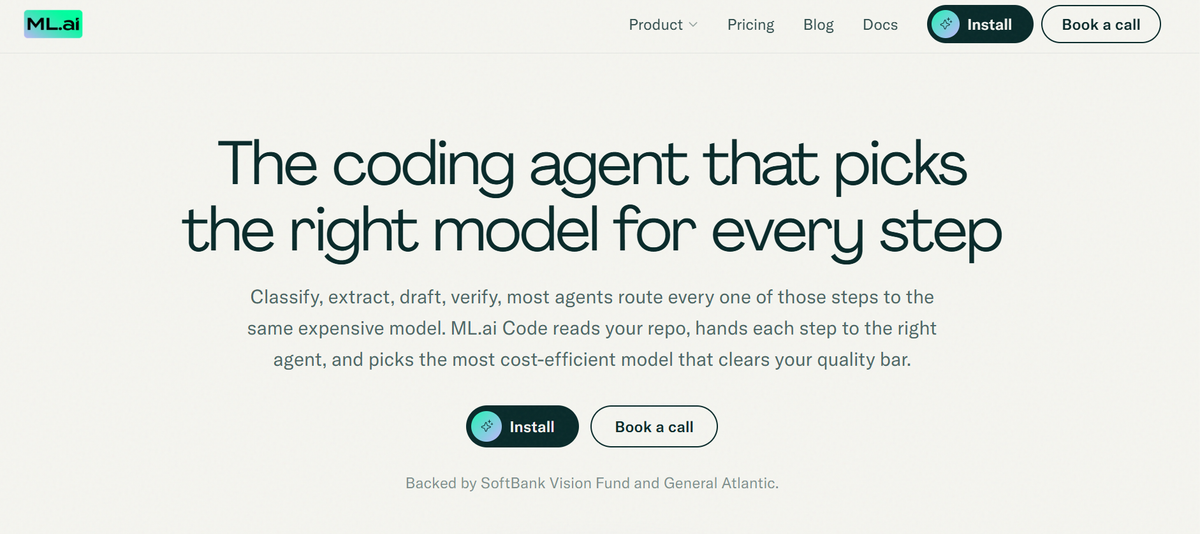
Use it when: your spend is going into AI-assisted development and you want the model choice made by the thing that can see the plan, the tool calls and the phase of work.
Everything in section 4 argues that the right routing boundary is a unit of work, and that an external gateway cannot see one. It receives a stream of requests. It does not know that turns 4 through 11 are a single sub-task, that the prefix is cached, or that the next tool call will invalidate everything. The agent knows all of that.
ML.ai Code puts the decision there. It runs as a VS Code and Cursor extension, and routes each step of a task to the cheapest model that clears the quality bar rather than sending classify, extract, draft and verify all to the frontier tier. The published per-task breakdown moves a completed task from $0.70 to $0.43 by keeping the draft and verification steps on the high tier and dropping classification and extraction to the standard one.
The controls that do the work are structural rather than heuristic.
Four agents with fixed blast radius: Explore searches and explains, Architect returns the order of work and the trade-offs, Plan writes that order to a file, and only General can modify code. Three of the four cannot write, which fences the cheap high-volume half of agent work off from the half where a mistake is expensive.
Delegated jobs hold their scope for the whole job, inline or in the background. That is the stickiness gate from section 4, enforced by architecture rather than by a classifier that gets referential follow-ups right 14 percent of the time.
Reasoning effort is set per message across five levels, so a two-line edit does not buy reasoning tokens nobody reads. Plan mode denies the edit and write tools outright, so exploration cannot quietly become expensive execution.
Nothing reaches disk without an explicit Allow, and the diff opens before the permission prompt is answered rather than after the write. On the benchmark side, ML.ai Code resolves 86 percent of SWE-bench Verified against 58 percent for a leading frontier model answering single-shot, using retries and test-driven verification instead of one expensive guess. That figure is measured on a 50-instance slice of the public set; the full 500-instance run and SWE-bench Pro are still in progress, and it should be read as a strong early signal rather than a settled result.
Trade-off to know: it is an editor agent and a harness, not a general-purpose gateway. If you need one endpoint in front of 400 models for a chat product, this is the wrong layer. It also has no independent benchmark result yet, per our own audit above.
If your model bill is mostly coding agents, the fastest honest test is to run it against a real repository for a week. Install ML.ai Code from the VS Code Marketplace, or book a call to run one workload through the shadow phase alongside what you have now.
2. OpenRouter: best for the fastest path to many models
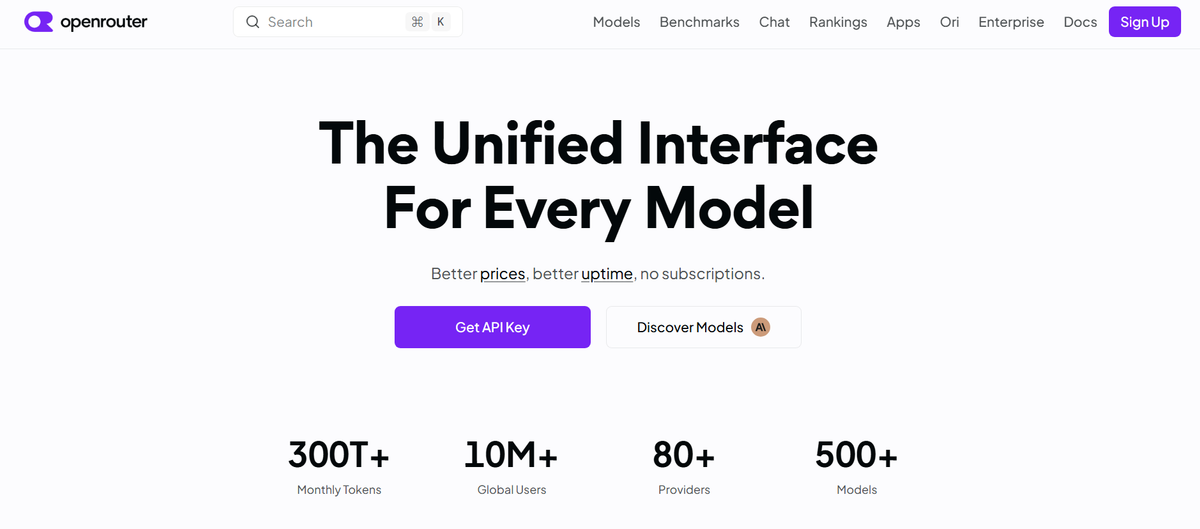
Use it when: you need breadth immediately and you have not yet earned the right to an opinion about routing.
Two routers live behind one API. Auto Beta classifies each prompt into roughly 30 fine-grained task types, then ranks candidates by which models the OpenRouter community actually spends on for that task type over a trailing seven-day window, filtered by a cost_tier band. It carries session stickiness, degrades to a default model set if classification is unavailable, and adds no fee beyond the selected model's own rate.
Be clear about what that signal is. Auto Beta routes on popularity, not on measured quality. Its own docs describe it as the wisdom of the market. That is a genuinely useful prior and it tracks new model releases within days with no retraining. It is not an evaluation, and it will not tell you whether the choice was right for your workload.
Pareto Code, released 21 April 2026, is the more interesting one for engineers. You set a single min_coding_score between 0 and 1, which maps to one of three tiers drawn from Artificial Analysis coding percentiles, and the router picks the cheapest available model in that tier. Omit the score and it defaults to the High tier. The :nitro variant picks the fastest instead of the cheapest.
Where it falls short: the older openrouter/auto slug is documented as deprecated, and Auto Beta routes as if you had asked for roughly the low cost band when you set nothing. Set cost_tier explicitly.
3. LiteLLM: best self-hosted gateway, and the best-documented router in the category
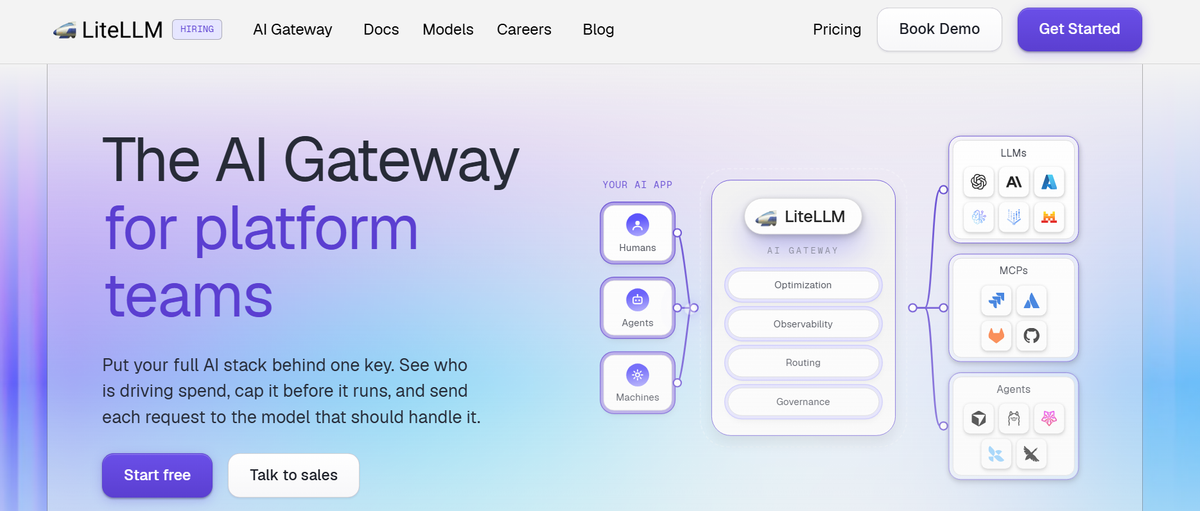
Use it when: you want to own the proxy, run air-gapped or on your own cloud, and you value a vendor that publishes its methodology.
LiteLLM covers 140-plus providers and 1,892 models behind an OpenAI-compatible endpoint. The Rust gateway benchmarks at 0.66 ms of added p99 overhead and about 22 MB resident memory under AI Gateway Bench, with the scripts published.
The Auto Router folds heuristic scoring, an LLM classifier, lexical and semantic keyword rules and Thompson-sampled tier pools into a single complexity_router with four tiers. What sets it apart is disclosure. The v1.97 post publishes the full context-window sweep, agreement tables across three datasets, paired latency confidence intervals that all contain zero, classifier cost at most $0.61 per thousand requests, and the cases where routing made traffic more expensive. It ships shadow evaluation so you can test the router on your own production traffic before switching anything.
Where it falls short: self-hosting moves dependency management and the supply-chain surface onto you, and March 2026 showed what that can cost. Run the official pinned Docker image rather than pip install litellm in CI.
4. Not Diamond Code: best learned router to sit on top of an agent stack you already have
Use it when: you are committed to Claude Code or a similar harness and want a routing decision layer without changing your gateway.
Announced 4 August 2026, Not Diamond Code is built specifically for long-horizon coding agents and claims cost reductions above 20 percent. It is the only commercial router that states cache-awareness as a design property: before each turn it models the future reward and cost of a model and reasoning-effort pair, accounting for the cost of switching while the cache is warm, and it may deliberately stay on a more expensive model to preserve it. It returns a recommendation your own gateway and harness execute, which keeps it stack-agnostic.
Trade-off to know: this is the product RouterArena ranked 12th of 12, on a general-knowledge benchmark, "because it frequently selects expensive models." That evaluation predates the coding-specific product and used a different workload, so it is a caution rather than a verdict. Ask for the optimal selection ratio on coding traffic.
5. vLLM Semantic Router: best for self-hosted open-weight fleets on Kubernetes
Reach for it when: you serve your own models and want routing, PII detection and jailbreak screening in one Envoy filter.
Built by Red Hat, IBM Research, AMD, Hugging Face and 50-plus contributors, it reached v0.1 "Iris" on 5 January 2026 and has shipped two named releases since. A ModernBERT classifier scores domain, jailbreak and PII signals; the core is Rust on Hugging Face's Candle; it deploys as an Envoy ext_proc filter and shares a GPU with your vLLM instances rather than demanding its own.
Its published benchmark, on MMLU-Pro with Qwen3 30B and auto reasoning-mode adjustment, reports accuracy on complex tasks up 10.2 percent with latency down 47.1 percent and token usage down 48.5 percent. Independently, RouterArena put it among the two best entries on the efficiency side of the frontier, at roughly 35 percent lower cost for under 2 percent accuracy loss. It is the only product in our audit with both a first-party cost-and-quality pair and an outside result.
Trade-off to know: RouterArena also measured it, alongside RouteLLM, as one of the two highest-latency routers in the set, because that configuration called an external embedding API. Run the classifier locally.
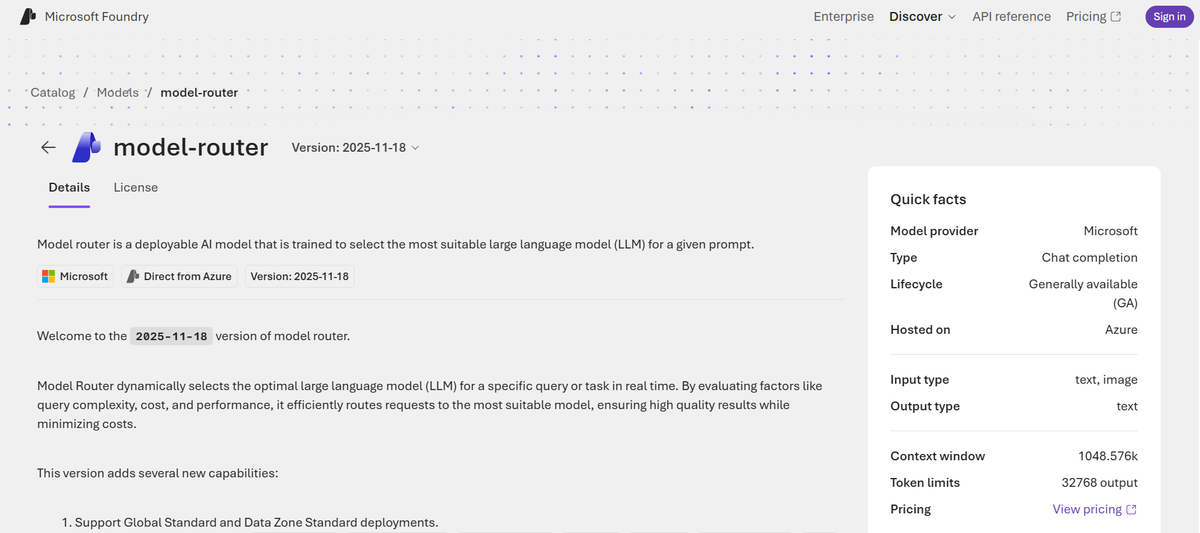
6. Azure AI Foundry Model Router: best for teams whose real constraint is governance
Reach for it when: approved model lists, data residency, and Azure Policy matter more than the last ten percent of savings.
Deployed like any other Foundry model, it routes across 27 models as of version 2025-11-18 in 28 regions, with three modes: Balanced, Quality, and Cost. You can pin an explicit model subset, and new base models are excluded from routing until you add them, which is the right default for a regulated deployment. It honors the same built-in Foundry deployment policy across the portal, REST API, CLI, and ARM templates.
Two limitations sit in the official concepts documentation and belong in any evaluation. Underlying models have different context windows, so a large-context call "will succeed only if the prompt happens to be routed to the right model." And for vision-enabled chats, the routing decision is made on the text input only.
Where it falls short: the honest savings range here is modest. A Microsoft community measurement across all three modes reported 4.5 percent in Balanced, 4.7 percent in Cost and 14.2 percent in Quality. Those are plausible numbers for a single-family pool, and they are a useful reality check against 85 percent headlines.
7. Bifrost: best when gateway overhead is your actual constraint
Reach for it when: you are running high-RPS agent loops, and the proxy itself is showing up in your latency budget.
Written in Go by Maxim AI, Bifrost unifies 20-plus providers behind an OpenAI-compatible API with failover, load balancing, semantic caching, and governance plugins. Its published benchmark reports 11 microseconds of added latency per request at a sustained 5,000 RPS on a t3.xlarge, 59 microseconds on a t3.medium, with a 100 percent success rate at 5k RPS.
Where it gets interesting: LiteLLM's AI Gateway Bench measures Bifrost at 4.54 ms p99 on its own harness. That is roughly 400 times the vendor's own figure, because one reports mean added latency and the other reports p99 under a different load generator against a different mock upstream. Neither number is dishonest, and neither is comparable. Treat every gateway latency claim as harness-specific and run the benchmark yourself on your own hardware.
The comparison, in one table
| Router | Decides on | Published cost saving | Quality figure alongside | Deployment | Best fit |
|---|---|---|---|---|---|
| ML.ai Code | Step and sub-task boundaries inside the harness | 30 to 45 percent | 86% SWE-bench Verified, 50-instance slice | Editor extension, local engine | Agentic coding workloads |
| OpenRouter | Task type, ranked by community spend share | Not published | Not published | Managed API | Fastest access to many models |
| LiteLLM | Complexity tier, four tiers, configurable signals | Multiple, methodology published | Terminal-Bench and agreement tables | Self-hosted or managed | Owning the proxy |
| Not Diamond Code | Each agent step, cache-aware | 20 percent and above | Claimed, no number | API returning a recommendation | Existing harness, no gateway change |
| vLLM Semantic Router | Semantic class via ModernBERT | 48.5 percent fewer tokens | +10.2% accuracy on complex tasks | Kubernetes, Envoy filter | Self-hosted open-weight fleets |
| Azure Foundry Model Router | Prompt complexity, three modes | Not published officially | "Comparable quality" | Azure-native | Governance and residency |
| Bifrost | Provider health and weights, not task difficulty | Not applicable | Not applicable | Self-hosted Go binary | Latency-critical gateways |
How do you pick one for your own workload?
Five steps. The first two are free, and roughly half of teams should stop after step three.
1. Log the fields that decide everything: Per call: model, input tokens, cached input tokens, cache write tokens, output tokens, latency, task type, and whether the result was accepted or retried. The cached-input field is the one teams skip and the one that determines whether routing can help you at all. A week of this costs an afternoon of instrumentation.
2. Compute your ceiling before you shop: Maximum savings is S = f x (1 - r), where f is the share of calls that can leave the frontier model and r is the cheap model's cost as a fraction of the frontier model's. Both come out of step one. If S lands under about 15 percent, do not buy a router. Spend the time on prompt caching, batch endpoints and reasoning effort instead, all of which are covered in the inference cost breakdown and carry no quality risk.
3. Build a golden set from your own traffic, per task class: Fifty to two hundred real requests with known-good outcomes, sampled from your logs rather than written by hand. This is the artifact that makes every later conversation with a vendor concrete. Without it you are comparing marketing.
4. Test the two conditions that predict production behavior: First, shadow the router on live traffic and compare routed spend against an all-frontier baseline priced with a warm cache, which is the only fair comparison. Second, and this is the step nobody takes, hold out a task class the router has never seen and measure it there. Section 2 is why. A router that looks fine on your calibration set and collapses on a new feature area will not announce itself.
5. Gate the rollout on the eval, and keep running it: Require the cheap model to clear a stated bar on each task class before that class becomes routable. Then keep the job running, because model versions change underneath you and a router calibrated in March is describing a model lineup that no longer exists.
What separates a production LLM router from a demo?
Seven properties. Only two of them appear on most vendor pages.
1. Optimality, not the headline saving
A saving figure with no quality figure beside it is half a sentence. RouterArena, presented at ICLR 2026 and the first standardized leaderboard for routers, scores on five axes rather than one: answer accuracy, answer cost, routing optimality, robustness to noisy input, and router latency.
Optimality is the axis nobody markets on, and it is the one that decides your bill. It asks how often the router picked the cheapest model that still answered correctly. A router can post a good accuracy number while burning money, and RouterArena caught exactly that. Across 12 routers on 8,400 queries, most clustered near the point of paying 100 percent of single-frontier-model cost for 100 percent of its accuracy, meaning they defaulted to the strong model and skipped the savings entirely. One entry reached only baseline accuracy while spending 378 percent of baseline cost.
Ask any vendor for optimal selection ratio. If they cannot produce it, they have not measured the thing you are buying.
2. Survival when the task type changes
This is the criterion the market almost universally ignores, and the one with the largest measured effect.
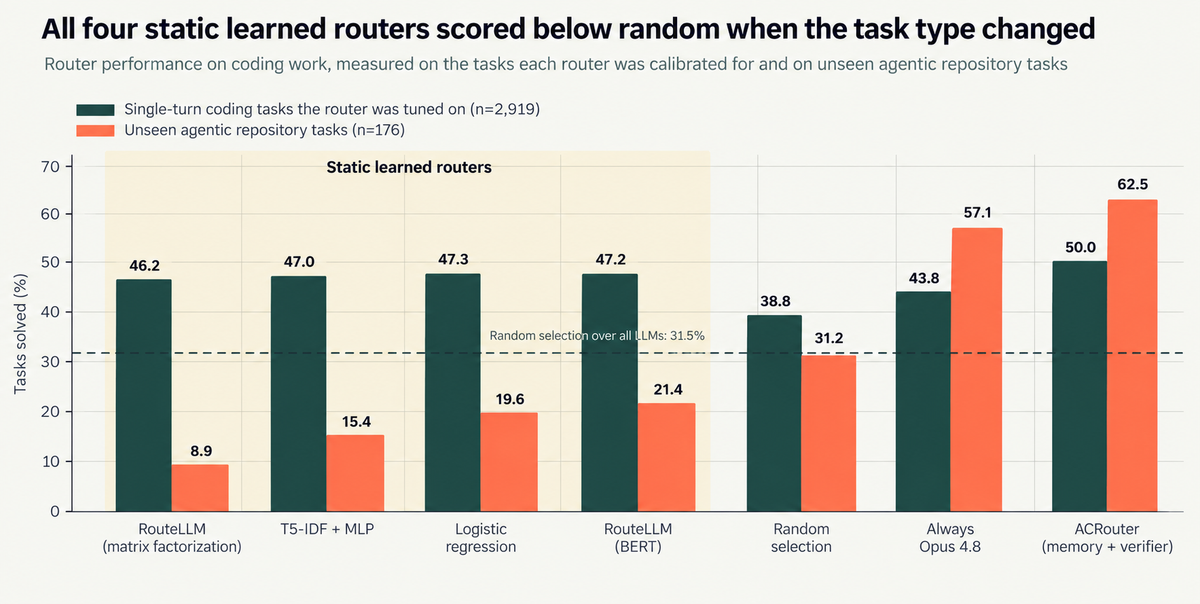
Four static learned routers scored 46 to 47 percent on the coding tasks they were calibrated for, then fell to between 8.9 and 21.4 percent on unseen agentic repository work. Random selection scored 31.25 percent. Source: CodeRouterBench, arXiv:2606.22902.
RouteLLM's matrix-factorization router went from 46.16 percent to 8.93 percent. The BERT variant went from 47.22 to 21.43. Meanwhile "always use Opus 4.6" held up at 57.14 percent, and the only router that beat it was one carrying an execution-verified memory of its own past decisions, at 62.50 percent for roughly 40 percent less spend than always-Opus.
The mechanism is not mysterious. Nine calibration dimensions were short single-file tasks, while the held-out set required multi-step planning, file navigation, and repeated rounds of debugging. Classifiers conditioned on prompt features that no longer carried signal, and they had no way to acquire new ones mid-stream.
A second 2026 paper reached the same place from a different angle. RouterXBench found that robustness is driven by training data diversity rather than architectural complexity. Combined, these two results give you a purchasing rule that is easy to apply: don't buy the clever architecture. Buy the router that has seen traffic shaped like yours, and insist on being shown a result on a distribution it was not tuned on.
3. What it does when the cache is warm
On an agent workload, the prompt cache is most of the bill. Our own breakdown of where LLM inference cost actually goes found cache reads accounting for 86.5 percent of one 28-day production coding-agent bill against 5.7 percent for generated output. Anything that invalidates that cache is a cost event, and switching models invalidates it.
Anthropic publishes the multipliers: a cache read costs 0.1x base input, a five-minute cache write costs 1.25x, a one-hour write costs 2x. So a switch turn costs roughly twelve times what staying put would have cost on the same prefix, and pays back only if the new model holds the session.
Here is where it gets genuinely contested, and worth knowing before you sign anything. There are three credible, measured positions in public right now, and they do not agree:
These are reconcilable. The provider keeps your abandoned prefix warm, so coming back is cheap; the expensive part is the write on the model you moved to. Whether that trade pays depends on how long your prefixes are and how often you return. Nobody can answer it for you, which is the point.
There is a second cache trap that almost nothing written about routers mentions. The cached-read discount is not the same across the providers; a cross-provider router will move you between them.
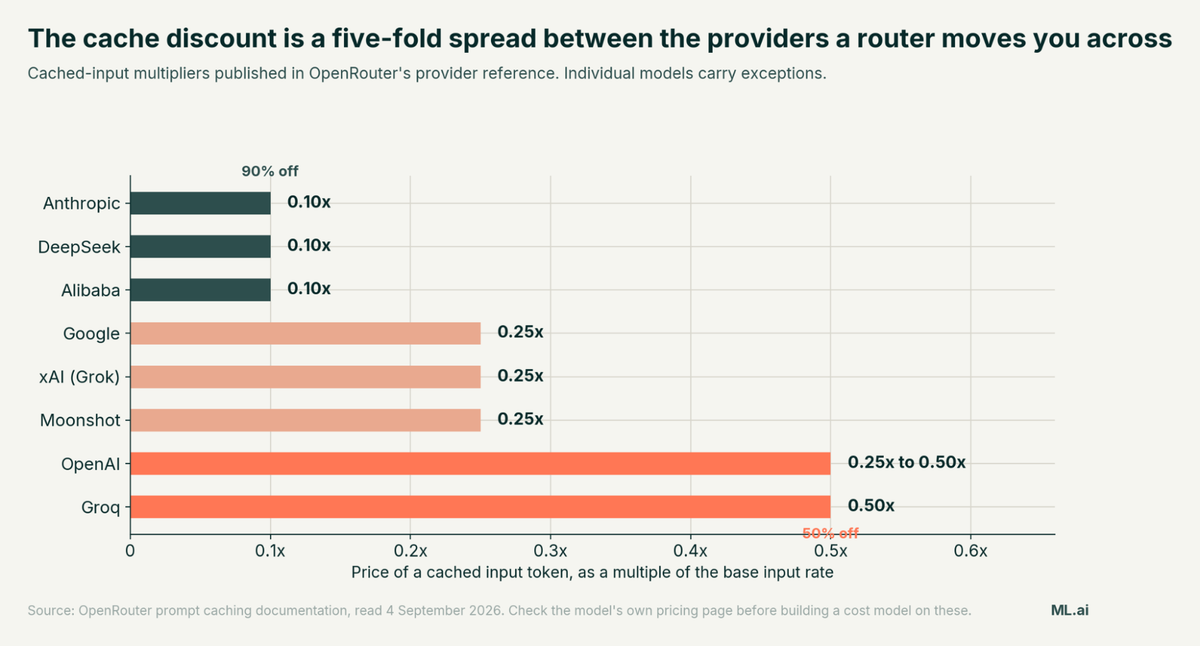
Cached-input multipliers published in OpenRouter's provider reference. A router optimising on base per-token price will happily move you from a 90 percent cache discount to a 50 percent one and record it as a saving.
4. Where the routing boundary sits
A router that re-decides on every turn is making a decision it does not have the information to make, and paying a cache write each time it changes its mind.
LiteLLM ran the cleanest public measurement of this. Across 5,600 live classifier calls, they tested how often the router's difficulty tier agreed with a reference label, varying only how many prior conversation turns the classifier could see.
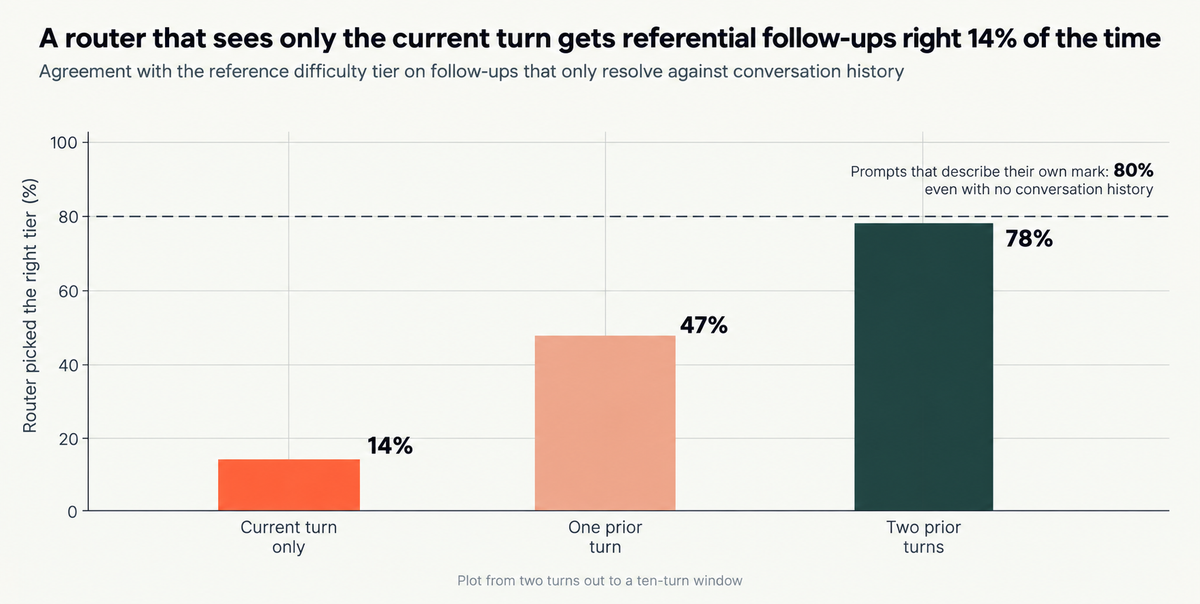
On follow-ups that only resolve against history, a single-turn classifier agreed with the reference tier 14 percent of the time. Source: LiteLLM Auto Router v1.97 benchmark, August 2026.
Fourteen percent. The canonical failure is a two-turn exchange: "Make a plan to redesign this component," then "Yes, go ahead." Turn two reads as trivial and authorises the whole redesign.
The consequence in their tier mix is worth sitting with. With no history, 66 percent of those requests were classified SIMPLE. With two turns of history, 30 percent were. Routed cost on that traffic rose from $2.87 to about $6.50 per thousand requests once the classifier could see context, because it stopped sending multi-file work to the cheap tier. Fixing the router made it more expensive and more correct at the same time. Any router whose saving comes from misreading short prompts is not saving you money, it is deferring the cost into a retry.
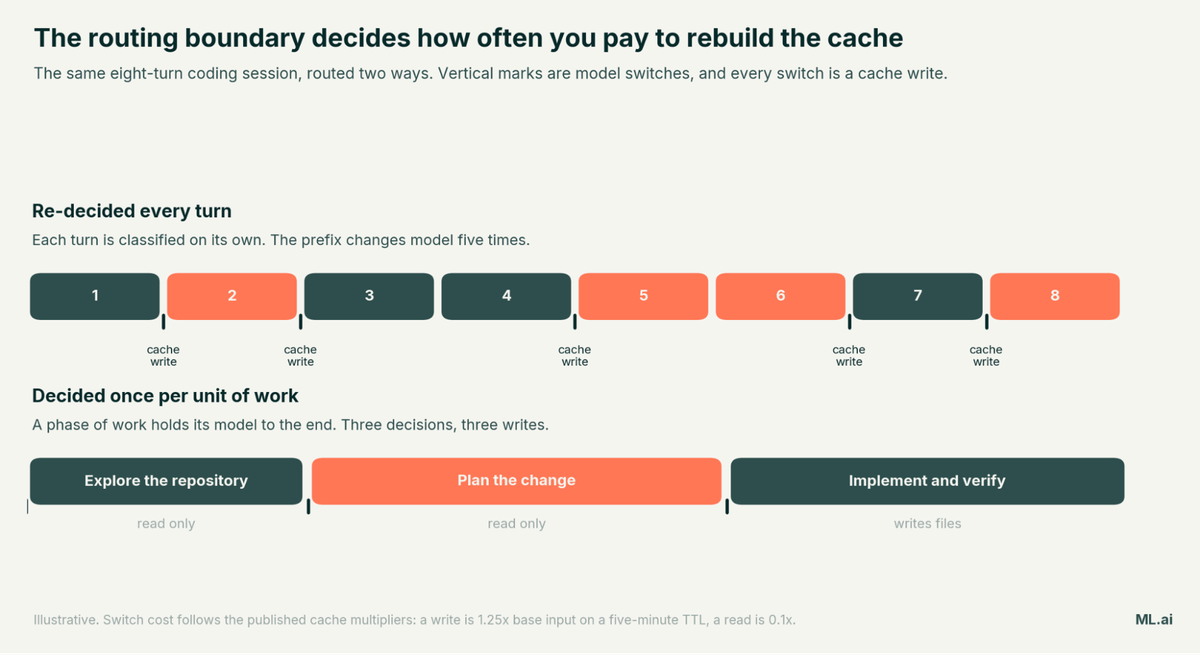
Good routing boundaries are the ones a session does not cross back over: a whole sub-task, a distinct phase, a background job.
5. Whether you can see and override the decision
When output quality drops, an engineer needs to answer one question fast: did the model change, or did I? A router that logs which model it chose, why, and what it cost is debuggable. One that does not is a source of mystery regressions, and the developer reaction to opaque automatic model selection has already been loud enough once to become a news story.
LiteLLM's engineering team stated the design principle plainly when shipping Auto Router v2: predictable beats clever for debuggability, and a fixed, versioned mapping from capability class to model is what makes "why did this response cost 4x today" answerable after the fact. Insist on a per-request model field, a per-request cost field, and an override.
6. Blast radius, because the router holds your keys
A router sits on the credential path by construction. It has your provider keys, and in a self-hosted deployment it usually has cloud credentials too. That makes it a high-value dependency, and 2026 supplied the demonstration.
On 24 March 2026, two backdoored releases of LiteLLM, versions 1.82.7 and 1.82.8, were published to PyPI after publishing credentials were exposed through a compromised dependency in its CI pipeline. They were live for roughly 40 minutes. Datadog Security Research traced the campaign and advised treating any host or CI job that installed them as a full-credential exposure event, covering SSH keys, cloud provider credentials, and Kubernetes secrets.
Two details matter for selection rather than for blame. Teams running the official Docker image were not impacted, because that path pins its dependencies. And the compromise arrived through frameworks that pull the router in transitively, so several teams were exposed without ever choosing it. When you evaluate a router, ask how it is distributed, whether releases are signed, whether the deployment path pins dependencies, and what it can read on the host. Self-hosted is not automatically safer than managed; it is differently exposed.
7. Who owns it in eighteen months
The routing and observability layer consolidated hard in 2026, and a maintenance-mode dependency is a slow-motion migration.
None of these is a reason to avoid the products. It is a reason to ask, in the evaluation call, what the roadmap looks like under current ownership and what the migration path is if it stops.
When should you not use an LLM router?
Three situations.
When your ceiling is small: Below roughly 15 percent, a router is a permanent piece of infrastructure with its own failure modes attached to a rounding error. Cache, batch and effort-tune instead.
When your traffic is uniformly hard: Routing savings track how uneven your traffic is, not how clever the router is. The same RouteLLM paper reports 73 percent savings on open-ended chat and 29 percent on multiple-choice knowledge with the same router on the same day. Coding agents sit closer to the second number, because almost every turn needs tool use, file context and multi-step reasoning.
When predictability is worth more than the saving: Manifest's argument deserves its hearing: in automated agentic workflows, managing an extra layer of uncertainty can cost more than it saves, in evals, prompts and observability. Their line is the one to weigh: "The amount saved is paid somewhere else, and that cost is harder to estimate."
The counter is not that they are wrong. It is that the uncertainty they describe comes from a router guessing at difficulty from outside the agent. A decision made at a boundary the system already knows about, by the component that can see the plan, is a different proposition from a proxy re-classifying every turn.
What to do next from here?
You now have the two questions that separate a router that will work from one that will demo well: what is its optimal selection ratio, and what happens when the task type changes.
You have a disclosure grid showing that only one of seven products currently answers both with evidence, and a sequence that tells you whether to buy anything at all.
Start with step one. Add cached-input tokens and task type to your request logs and leave it running for a week. That single field is the difference between a real value for f and a guess, and it is what turned IBM's cost estimate upside down.
If the work generating that bill is AI-assisted development, the routing decision belongs inside the harness rather than in front of it. ML.ai Code is built at that layer: read-only agents for the cheap half of the work, scoped delegation that holds its model for a whole job, per-message reasoning effort, and a diff in front of every write. Install it from the Marketplace and run it against a real repository, or start a 30-day pilot on one workload with the numbers agreed in writing before anything moves.
Frequently Asked Questions
What is an LLM router?
An LLM router is a decision layer between your application and a pool of models that sends each request to the model most likely to complete it acceptably at the lowest cost. Pre-generation routers decide from the prompt alone; cascading routers let a cheap model answer first and escalate when a scorer rejects the answer. Most production systems now combine both.
Do LLM routers actually save money?
Yes, but far less than headline figures suggest, and the amount depends on your traffic rather than the router. Published results range from 73 percent on open-ended chat down to 21 to 28 percent on coding agents, and every result that reports both numbers also reports a quality cost. Compute S = f x (1 - r) from your own logs before believing any vendor figure.
What is the difference between an LLM router and an AI gateway?
A gateway gives you one endpoint, failover, key management, budgets and observability across many providers. A router decides which model handles a given request. Most gateways now ship a router, but the two capabilities are independent: Bifrost is a strong gateway with no task-difficulty routing, and Not Diamond is a router that expects you to bring your own gateway.
How much latency does an LLM router add?
Very little, and it is the weakest objection to routing. RouterArena measured most routers under 100 ms end to end, IBM measured an optimization-based router at about 6 ms, and LiteLLM's context-window sweep found every paired latency confidence interval containing zero. Cache invalidation, not latency, is the real cost of a routing decision.
Which LLM router is best for coding agents?
The ones designed for the boundaries of agent work rather than for individual requests, because CodeRouterBench showed static classifiers dropping below random selection on unseen agentic tasks. ML.ai Code makes the decision inside the harness with read-only agents and scoped delegation; Not Diamond Code sits on top of an existing harness and is explicitly cache-aware. Test either against a held-out task class before rolling out.
Can I build my own LLM router instead of buying one?
You can, and the measurement work is identical either way, so do steps one to three of the sequence above first. If you build, start with a per-task-type lookup table: CodeRouterBench found that the simplest heuristic, routing each dimension to its best-performing model, reached about 83 percent of oracle performance at near-zero overhead. Add a learned classifier only when that baseline demonstrably falls short.
Does switching models break prompt caching?
Switching away costs you a cache write on the new model, billed at 1.25x base input for a five-minute TTL against 0.1x for the read you abandoned. Switching back may be cheaper than assumed: LiteLLM examined 4,684 switch-backs and found 97.4 percent of caches still warm at the five-minute TTL. The trade depends on prefix length and how often you return, so measure it on your own traffic.
Written by
Taran Srivastava
Senior Product Manager