
GitHub Copilot alternatives worth evaluating in 2026

Taran Srivastava
Senior Product Manager
The best GitHub Copilot alternative in 2026 is whichever tool finishes your task in the fewest tokens, because since 1 June 2026, tokens are the bill. GitHub replaced premium requests with AI Credits consumed by input, output, and cached token counts.
You need to know the alternative that measures tokens per unit of work. This blog compares six tools on the number that now decides what you pay.
Why do teams look for GitHub Copilot alternatives?
Something specific broke, and it was not the model. GitHub changed how it charges, and that change turned a property most people never evaluated — how efficiently a tool spends context — into the single largest driver of monthly cost. Everything below traces back to that.
What Copilot still does better than anything else
Start with the part that is genuinely hard to replace, because pretending otherwise makes the rest of the comparison useless.
Copilot's real product is distribution. It is the default in Visual Studio Code and comes with a Microsoft agreement your legal team already signed. That second point is the moat. On the Hacker News thread about the billing change, the top-voted explanation of why enterprises stay had nothing to do with model quality:
"Corporations already have a data agreement with MS, storing all their data there. GitHub Copilot is covered by that, while an individual agreement with e.g. Anthropic needs lawyers involved." (Epa095, Hacker News)

Another commenter working with regulated data put a number on it: a Data Security Exhibit "starts at 6 weeks and can hit 6 months to complete." If your procurement path to any other vendor is six months, Copilot's effective price includes six months of not shipping.
The second thing worth keeping: code completions and Next Edit suggestions remain included in every plan and consume zero AI Credits. If you mostly use tab-complete, Copilot Pro at $10 is still a reasonable deal and this article is not for you.
This article is for the other case: you run agentic sessions. Multi-step tasks, tool calls, test runs, repository-wide edits. That is where the economics inverted.
What actually changed on 1 June 2026
On 27 April 2026, GitHub Chief Product Officer Mario Rodriguez announced that every Copilot plan would move to usage-based billing on 1 June. Premium request units were retired. In their place, each plan includes a dollar allotment of GitHub AI Credits, and credits are drawn down "based on token consumption, including input, output, and cached tokens, using the listed API rates for each model."
Rodriguez was direct about the reason: "a quick chat question and a multi-hour autonomous coding session can cost the user the same amount," and GitHub had been absorbing the difference.
Four details in that announcement matter more than the headline, and most coverage skipped all four.
The number that changes again this week
Here is the part almost nobody has written down. To smooth the transition, GitHub gave existing Business and Enterprise customers promotional credits for June, July, and August only: $30 a month for Business, $70 a month for Enterprise.
That promotion expires in August. From September, included usage reverts to the seat value.
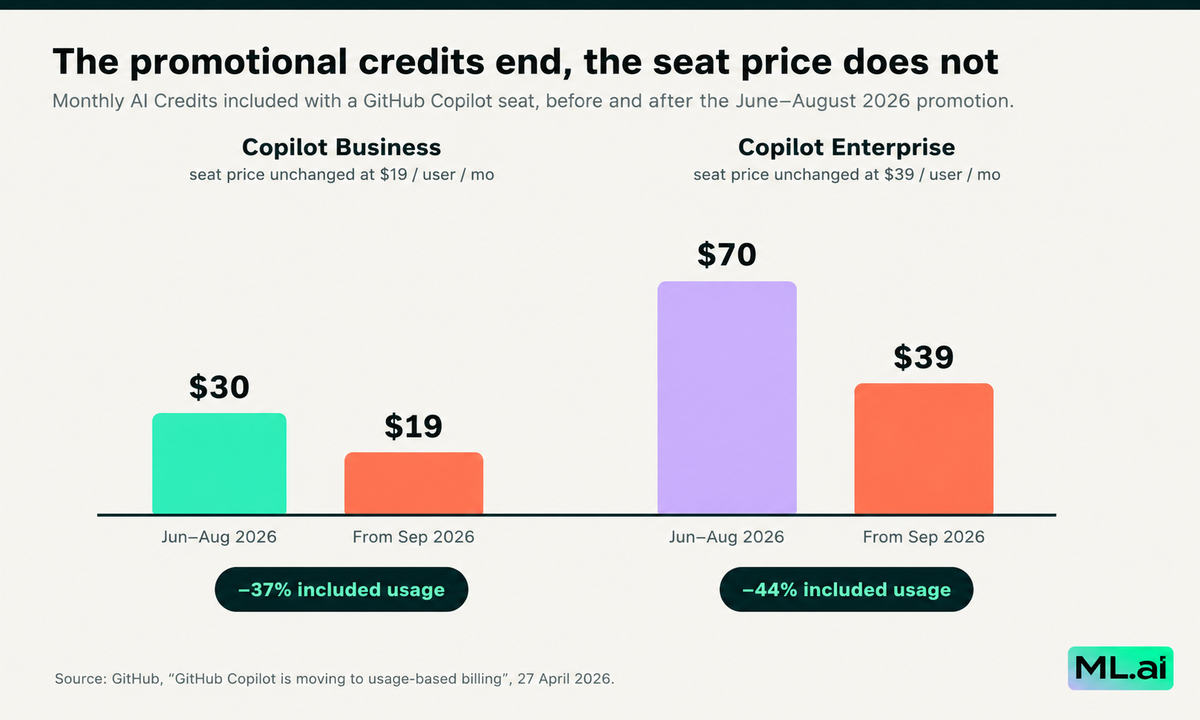
Included monthly AI Credits per Copilot seat, before and after the June to August 2026 promotion. Seat prices are unchanged. Source: GitHub, 27 April 2026.
Business drops from $30 to $19, a 37% cut in included usage. Enterprise drops from $70 to $39, a 44% cut. Neither seat price changes, so nothing appears on your invoice as an increase. Teams that calibrated their agent workflows against summer credit levels will hit the ceiling roughly a third earlier and will experience it as an overage, not as a price change.
There is a second dated change stacked behind it. GitHub's 28 August changelog reopens the frozen Business and Enterprise signups on 1 September with stricter account vetting, requires payment for each seat before users get access, and applies upfront seat charges to existing card and PayPal customers from 1 October.
If you are running an evaluation, September and October are the two months where your baseline moves under you. Measure now.
What developers actually complain about, counted
Vendor blog posts describe complaints. It is more useful to count them.
We checked all 551 comments on the Hacker News thread that followed the billing announcement, the largest single public discussion of the change at 767 points. Cost, price or billing language appears in 182 of them (33%). Token consumption appears in 64 (12%). Local or open-weight models appear in 39 (7%).
Then we counted which tools those developers named, and compared it against the 11 pages ranking for this keyword.
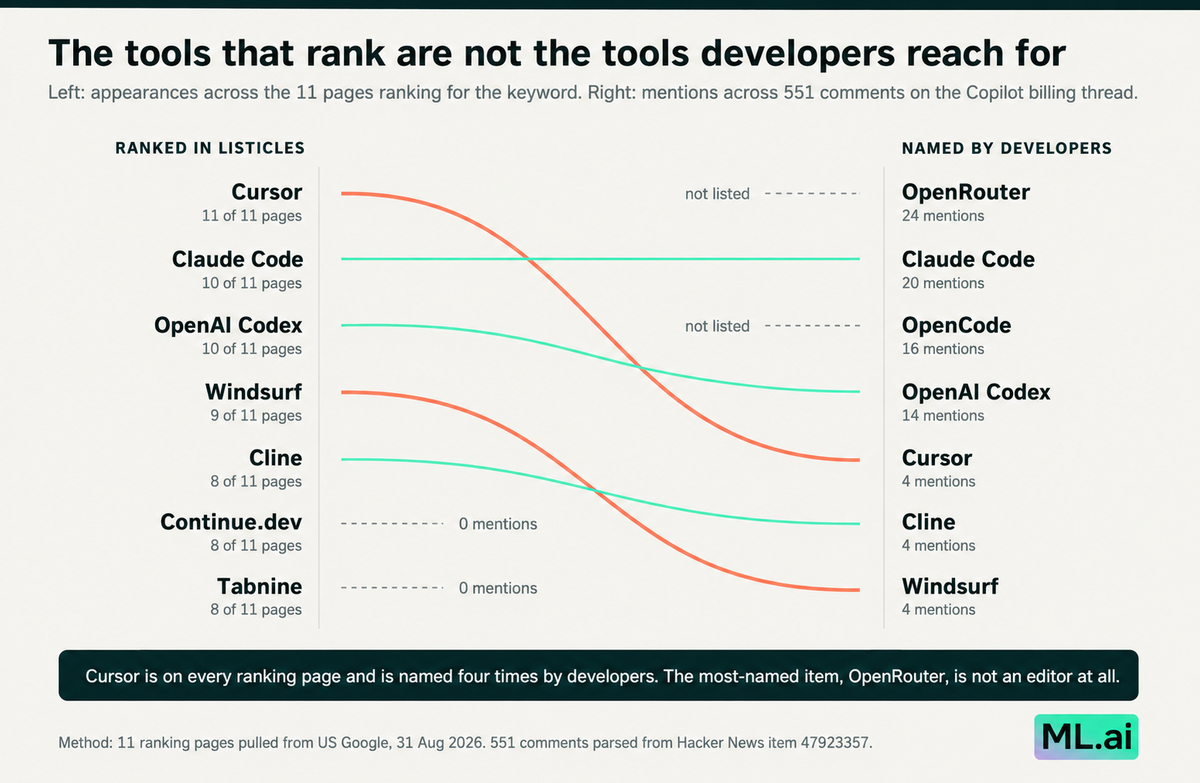
Tools ranked by appearances across the 11 pages currently ranking for "github copilot alternatives", against mentions across 551 comments in the Copilot billing thread.
Cursor appears on all 11 ranking pages and is named four times by developers. Claude Code holds its position at 10 pages and 20 mentions. Codex holds too. But the single most-named item, at 24 mentions, is OpenRouter, which is not an editor at all. It is a routing layer you point your own key at. OpenCode, an open-source agent that appears on no mainstream listicle we tested, is named 16 times. Continue.dev and Tabnine appear on 8 pages each and were named zero times.
Read that as a signal about the trigger. When the reason for switching is cost, developers do not shop for a different $20 subscription. They look for a way to see and control their spending per call.
Three complaints recur in a shape you can act on.
Nobody can predict what a run will cost: One developer described the old arbitrage plainly: "I was using 100M+ tokens per day, $250 per day or so and only paying $160 per month to GitHub" (fomoz).

At 20 working days, that is roughly $5,000 of inference against $160 paid. Another put it as "I did many 1h+ sessions of agent asking questions, delegating to subagents, all for 1 premium request. I would say its a x1000 increase in price for agentic workflows" (pojzon).

Those are the same run priced two ways.
Context is where the money goes, and quality goes with it. This comment is the most useful technical statement in the whole thread:
"As the context window fills up, the quality goes down, and the token usage spikes as the model traps itself into low confidence reasoning loops." (dirtikiti, Hacker News)

One mechanism, two failures at once. You pay more, and you get worse output, from the same cause.
Failed runs still bill: "When I tried to use Opus for longer tasks with Copilot, it would fill up the context completely and then crash without any output, while still consuming premium requests" (johndough). Under token billing, a crashed run bills for every token it consumed on the way to producing nothing.
Stack Overflow's 2025 Developer Survey confirms the last point is not an edge case. Adoption reached 84%, up from 76%, with 51% of professional developers using AI tools daily. But favourable sentiment fell from above 70% in 2023 and 2024 to 60%. More developers distrust output accuracy (46%) than trust it (33%). And the largest single frustration, cited by 66%, is "AI solutions that are almost right, but not quite," followed by 45% saying debugging AI-generated code takes longer.
That 66% used to be a productivity complaint. Since 1 June it is also a billing line.
Mechanism nobody is talking about
Here is why "almost right" costs so much more under token billing than it did under per-request billing, and it is the argument the ranking pages miss.
When you paid per request, an almost-right answer cost you one more request. Flat. When you pay per token, an almost-right answer costs you the entire conversation again, because the full history plus every file already read is re-sent on the retry, plus the failed attempt now added to it, plus fresh reasoning tokens. The retry is always the most expensive turn in the session and the one most likely to occur.
Break a single agentic turn into where the tokens actually go.
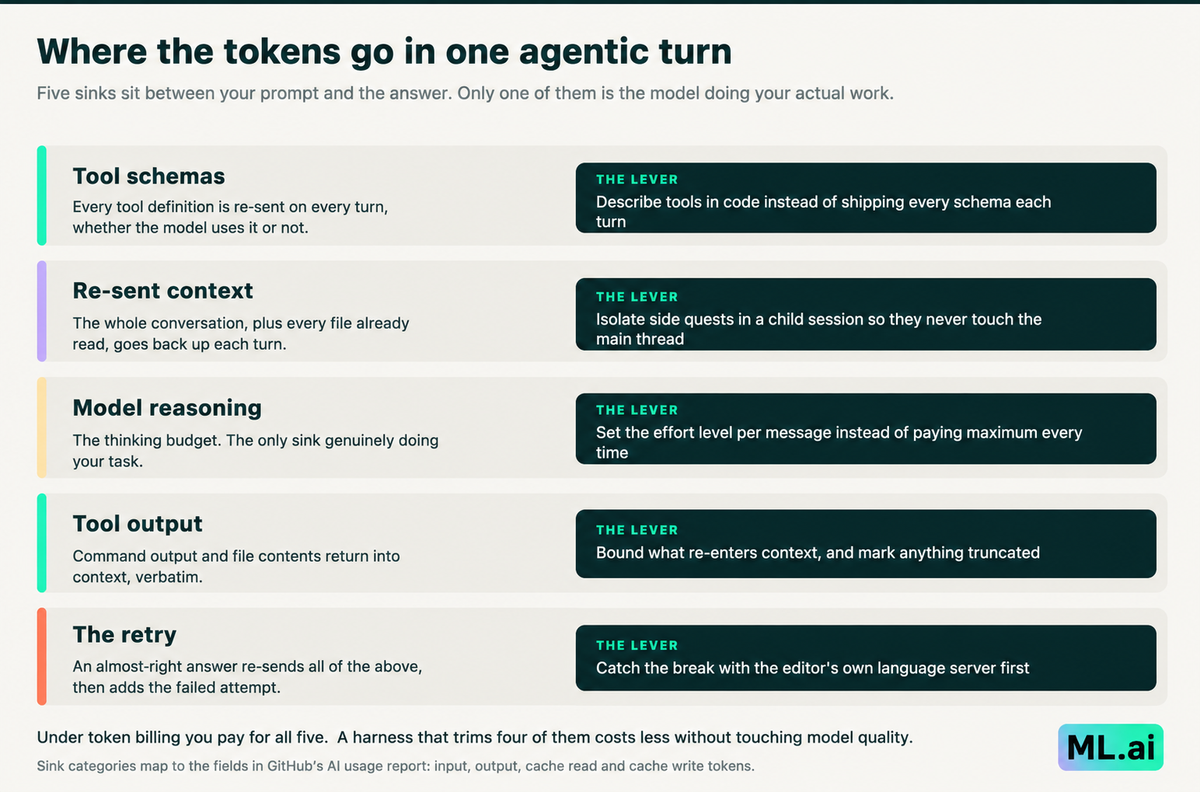
Five token sinks in one agentic turn, and the control that reduces each. Sink categories map to the fields GitHub now exposes in its AI usage report: input, output, cache read and cache write.
Only one of those five is the model doing your work. The other four are overhead produced by the tool wrapped around the model, the layer usually called the harness. They are the same four regardless of which model you pick, which is why the tool matters more than the model for cost: swapping models changes the rate per token, but the software around it decides how many tokens there are.
GitHub itself confirmed the unit of account on 11 August 2026, when it shipped a per-model token breakdown in the usage report. Its stated reason: previously, "it was hard to explain a charge or find ways to bring it down." Now the report shows input, output, cache read, and cache write tokens per model.
Windsurf, now Devin Desktop, made the same shift in March 2026 and published the levers explicitly. Its quota documentation tells users to make their allowance last by being "precise with your instructions and remove unnecessary context," switching to lower-cost models "for routine tasks," and avoiding "unnecessarily long sessions when a quick prompt will do."
A vendor is telling you here that the three levers are context hygiene, effort tiering, and session scope. Almost no coding tool exposes all three as controls you can set. That gap is what the comparison below is actually measuring.
Best GitHub Copilot alternatives compared
Six tools, chosen because each one appeared repeatedly in the developer thread where the trigger was cost. They are compared on how you pay and what control you get over token spend, not on feature checklists.
| Tool | Where it runs | How you pay | Token control it gives you | Best when |
|---|---|---|---|---|
| ML.ai Code | VS Code and Cursor extension | One access token, engine bundled | Per-message effort levels, plan-only mode, read-only search agent, isolated delegate sessions | You need agentic work with per-repo spend discipline |
| Claude Code | Terminal and IDE | Claude Pro from $17/mo annual, Max from $100/mo | Subscription absorbs burn, usage caps by plan tier | One hard problem, deep single-session reasoning |
| OpenAI Codex | Terminal, IDE, cloud | Bundled with ChatGPT plans, credits extend | Speed settings change credit draw, org spend controls | You are standardised on the OpenAI stack |
| Cursor | Standalone editor | Free, $20/mo Individual, $40/user Teams | Plan-tier agent limits, pooled usage on Enterprise | A whole team wants one editor with central admin |
| Cline | VS Code extension | Free and open source, inference at cost or BYOK | Full per-call token accounting, any provider | You want the key, the model and the logs |
| Continue.dev | VS Code and JetBrains | Free and open source, bring your own model | Complete control of prompts, context and routing | You are running local or self-hosted models |
Sources for pricing: Cursor, Claude, Cline, checked 31 August 2026. Prices change; verify before committing.
1. ML.ai Code
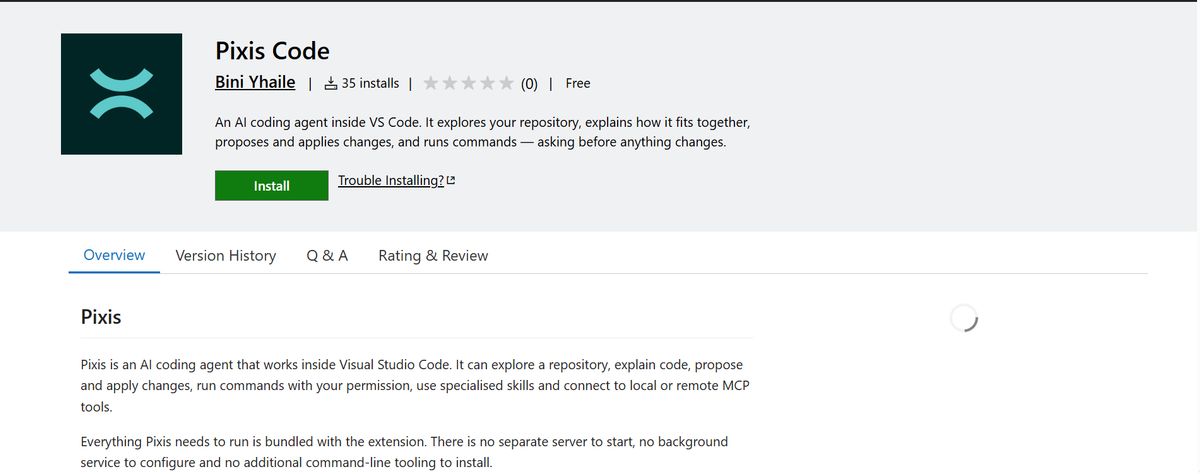
Best for: agentic development where somebody has to answer for the token spend.
ML.ai Code is an AI coding agent that runs inside Visual Studio Code. It reads your repository, explains how it fits together, proposes and applies changes, and runs commands with your permission. The coding engine ships inside the extension, so there is no separate server to start, no background service, and no command-line tooling to install. You install one package, paste one access token, open a folder.
That single-token setup matters more than it sounds. One token covers everything the agent does, with no per-service keys to collect. It is held in VS Code SecretStorage, never displayed again after saving, and never included in copied diagnostics.
What makes it the right pick for this particular problem is that every one of the four overhead sinks above is exposed as a control you can actually set.
Reasoning effort, chosen per message: Five levels from low to max, defaulting to medium, applied to the next message and changeable on any later turn. This is the "thinking budget" control the Hacker News thread kept asking for. One commenter wrote that when pressing enter, "it'd be nice to have a 'budget' per prompt, much like the model multiplier" (ThunderSizzle). A rename-this-variable task and a cross-module refactor should not draw the same reasoning tokens, and here they do not.
Plan mode that is enforced, not suggested: Plan investigates and produces a written plan without touching your files. The edit and write tools are switched off at the tool layer rather than discouraged in a prompt. The point is economic as much as procedural: you find out the approach is wrong before you have paid a frontier model to implement it across nine files.
One caveat worth stating, because the documentation states it: Plan restricts tools, not consequences. Running a test suite still writes coverage files and caches. Plan changes no source; it does not change nothing.
Four agents with different blast radius: Type @ to hand work to a focused agent. Explore searches and explains. General carries out work that is already well defined, in one self-contained turn. Architect designs an approach for a big or unfamiliar change and returns the order of work, the files involved and the trade-offs. Plan does the same and writes the finished plan to a markdown file for review. Only General can change your code. The other three cannot, which means the cheap investigation phase genuinely cannot cause an expensive accident.
Delegation that keeps context out of your main thread: Delegated work runs inline, where ML.ai waits because the next step depends on the answer, or in the background, where the task detaches into its own session and notifies you when it lands. Tasks started together run in parallel either way. The cost consequence is the one the ranking pages never mention: a delegated run holds its own context. A twenty-file investigation that runs in a child session does not re-enter your main conversation on every subsequent turn, which is exactly the re-sent-context sink.
Diagnostics from your own editor, not a guess. After the agent changes a file, ML.ai asks the editor what broke, using the language servers you already have installed, and gives the answer to the model. Two implementation details make this work: the file is loaded into the language services without being displayed, so your focus is never taken, and ML.ai waits for analysis to settle rather than reading an empty result and reporting a clean file.
This attacks the 66% "almost right" problem at its source. A type error caught by your own language server costs a targeted fix. The same error caught by the model re-reading files costs a full retry.
Memory that stops you re-explaining. Durable notes about your project and preferences carry across sessions, on by default. Context you established once is not paid for again next week.
Controls worth knowing about, all of which take effect on the next engine start:
| Setting | Default | What it does |
|---|---|---|
| ml-ai.commandSafety | true | The shell command safety classifier. Turning it off restores prompt-on-every-shell-command behavior; verdicts are still logged. |
| ml-ai.experimental.codeMode | false | The model calls tools by writing a short program instead of receiving full tool schemas every turn, saving roughly 1,700 tokens per turn. |
| ml-ai.experimental.workspaces | false | Enables worktree/workspace/project-copy/sync surfaces and isolated delegate runs. Off by default: these routes touch git worktrees and can move or delete uncommitted work. |
| ml-ai.denyCredentialAccess | false | Blocks the agent from reading credential files outright. |
And the guardrails: Anything with a side effect asks first. Allow permits this occurrence, Always saves a rule, Deny stops that path. Edits and writes open a native VS Code diff before the permission is requested, so you approve a change you have actually seen. Saved rules persist, so use Always deliberately. You can also connect MCP servers, local or remote, scoped per project or globally, with environment variables, headers, timeouts and OAuth sign-in.
Limitation: ML.ai Code needs VS Code 1.125.0 or newer and runs on macOS Apple Silicon or Windows 64-bit Intel and AMD. Linux, Intel Macs, Windows ARM64 and browser-hosted VS Code are not part of this release, because the engine bundle contains native binaries. Cursor can install the matching package when its VS Code compatibility level meets the requirement. It works against a workspace, not a single loose file. If you are on Linux, you should consider reading the Cline and Continue.dev entries instead.
If your problem is that agent runs are now a line item somebody has to defend, that is the exact problem these controls exist for. Install ML.ai Code from the Visual Studio Marketplace and run the token benchmark in the next section against whatever you use today.
2. Claude Code
Best for: one genuinely hard problem where you would rather wait than iterate.
Claude Code is the tool developers named most often in the billing thread, at 20 mentions, and it appears on 10 of the 11 ranking pages. It runs in the terminal and integrates with IDEs, and it is included in Claude Pro at $17 a month on annual billing or $20 monthly, with Max from $100 a month offering 5x or 20x Pro usage.
The reason it shows up in a cost thread is not that it is cheap. It is that a subscription with usage caps absorbs variance in a way per-token billing does not. You hit a limit and wait, rather than receiving a surprise invoice. Several commenters described exactly this pattern, using Copilot as spillover when their Claude plan hit limits.
The trade-off is the flip side of the same coin. Limits are opaque. One commenter noted the problem: "It's not clear what a 5 hour usage window in Claude Code can do." You have swapped an unpredictable bill for an unpredictable stop.
Choose it when the work is hard enough that depth beats efficiency, and when a hard stop is less costly to you than a variable invoice.
3. OpenAI Codex
Best for: teams already standardized on the OpenAI stack.
Codex appears on 10 of 11 ranking pages and was named 14 times in the thread, including by developers who canceled Copilot and moved directly to it. It runs in the terminal, in IDEs and in the cloud, and comes bundled with ChatGPT plans rather than sold separately.
One mechanic is worth knowing before you evaluate: OpenAI's documentation states that speed configurations increase credit consumption, and that fast mode draws credits at a higher rate for supported models. That is the same effort-tiering lever ML.ai Code exposes as a setting, expressed as a pricing knob. Plus and Pro users who hit their limit can buy additional credits without upgrading their plan.
The honest positioning: if your organization has an OpenAI agreement and your procurement path to a new vendor runs six months, Codex is the shortest route out of Copilot that still gets you a modern agent.
4. Cursor

Best for: a whole team that wants one editor and central governance.
Cursor is the only tool on all 11 ranking pages, and it earns that. It is a standalone editor built on VS Code with strong multi-file editing, and the pricing is legible: free Hobby tier, $20 a month Individual with Pro, Pro+ and Ultra steps at 3x and 20x agent limits, $40 per user a month for Teams, and custom Enterprise.
The team features are the real argument. Teams gets centralized billing, usage analytics, team-wide privacy mode, and SSO. Enterprise adds pooled usage, spend caps, repository and model access controls, audit logs, and an AI code tracking API. If your actual problem is thirty developers with no visibility, that admin layer is worth more than a per-token saving.
The caution is the gap this article opened with. Cursor is named on every listicle and four times by developers in a thread about cost. It is a strong editor. It is not primarily a spend-control tool, and its own tiers are expressed in multiples of agent limits rather than in tokens.
5. Cline
Best for: engineers who want the key, the model and the logs.
Cline is a free, open-source VS Code extension with a CLI, and its pricing page states the model plainly: free for individual developers, pay only for AI inference on a usage basis, no subscriptions and no vendor lock-in. You bring your own API keys or buy inference at cost, and it supports Anthropic, OpenAI, Gemini, OpenRouter, AWS Bedrock, GCP Vertex, Groq, Cerebras, DeepSeek and more.
For an AI engineer running high-volume work, the important property is auditability. Every call is yours, against your key, with your provider's own usage dashboard behind it. That is why BYOK routing dominated the developer thread: it is the only configuration where the token number is not somebody else's abstraction.
The trade-off is that you now own the bill directly, with no included allotment absorbing the first $19. Cline gives you the meter. It does not give you a smaller number by itself.
6. Continue.dev

Best for: local, self-hosted or heavily governed model setups.
Continue.dev is the open-source pick. Google's own AI Overview surfaces first for this query, and it appears on 8 of the 11 ranking pages. It works in VS Code and JetBrains, connects to any LLM, and supports local models through Ollama and LM Studio. You get inline completions, a chat sidebar with codebase context, and an agent mode, with full control over prompts and context.
It is also the sharpest illustration of this article's finding, because developers named it zero times in the 551-comment thread. High listicle presence, no organic mention in the discussion where the trigger was cost.
That does not make it a bad tool. It makes it a tool whose payoff is specific: if you need code never to leave your infrastructure, or you are running open-weight models on hardware you own, Continue.dev is the most direct path, and the running cost approaches your electricity bill. If you want a working agent this afternoon, the configuration burden is real.
Note: continue.dev has been acquired by Cursor, but it is one of those that was considered a worthy alternative.
How to run an evaluation for GitHub Copilot alternatives
Here is a benchmark you can actually run, because it measures the thing you now pay for.
Which tool fits which constraint
There is no single winner here, and any page claiming one is selling something. The right answer falls out of whichever constraint binds you hardest.
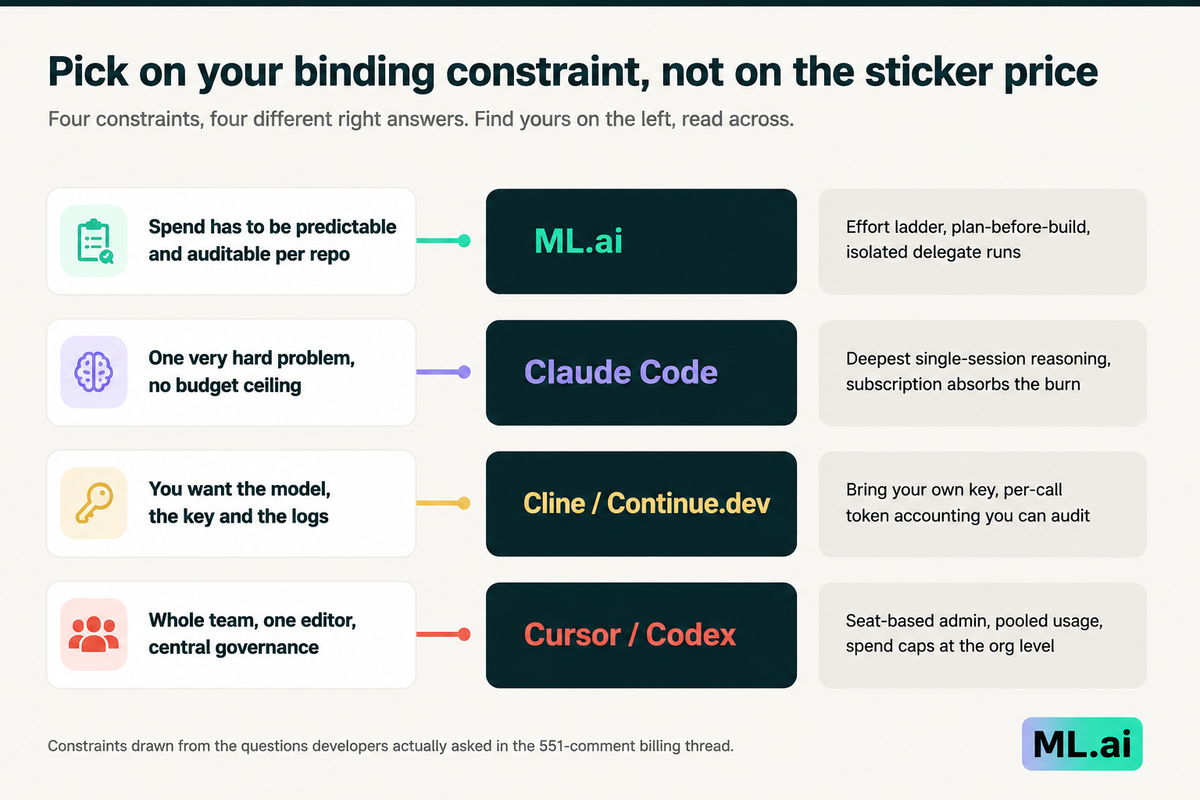
Four constraints, four different right answers. Constraints drawn from the questions developers asked.
Where spend has to be predictable and defensible per repository, you want per-message effort control, a plan step before implementation, and delegated work that keeps its context to itself. One very hard problem with no budget ceiling is a different purchase: buy depth. Needing the key and the logs points to BYOK, and accepting that you now own the meter. A whole team with no visibility should buy the admin layer first and optimize tokens second.
What goes wrong after you switch
Three failures show up in the first month, and all three are avoidable.
Conclusion
You now have the actual mechanism behind the price change, a count of what developers reach for when cost is the trigger rather than what ranks, and a benchmark that measures the number your invoice is built from. The first step is small: pick one finished ticket, run it through your current tool, and write down input tokens, output tokens and retries. That single row of data will tell you more than every comparison page on this keyword, including this one.
If the number surprises you, the levers that move it are effort per message, a plan step before implementation, and side work that stays out of your main context. Those are the controls ML.ai Code puts in the editor you already use. Install it from the Visual Studio Marketplace, run the same ticket again, and compare the two rows.
Frequently Asked Questions
Is GitHub Copilot still worth it in 2026?
For code completion, yes. Completions and Next Edit suggestions consume no AI Credits on any plan, so Copilot Pro at $10 a month remains good value if that is mostly what you use. For agentic work, the calculation changed on 1 June 2026 when usage moved to token-based AI Credits, and heavy agent users should re-measure rather than assume.
What is the cheapest GitHub Copilot alternative?
Cline and Continue.dev are free and open source, so your only cost is inference through your own API key or a locally hosted model. That makes them cheapest at the sticker level, but not automatically cheapest per completed task, since you lose the included credit allotment and inherit the full token bill. Run the benchmark above before deciding.
Why did GitHub Copilot get more expensive if the prices did not change?
Because the unit changed. Seat prices are identical, but a seat now includes a fixed dollar amount of AI Credits drawn down by token consumption rather than a count of premium requests. A long agentic session that used to cost one premium request now costs whatever it burns. GitHub's own explanation is that "a quick chat question and a multi-hour autonomous coding session can cost the user the same amount," and that this was not sustainable.
Does switching tools actually reduce token spend, or just move it?
It reduces spend only if the new tool changes how much context it sends. Model choice sets the rate per token. The software around it sets how many tokens there are. Tools that re-send full tool schemas each turn, return verbatim command output into context, and retry without checking the editor's own diagnostics will burn more tokens on identical work regardless of which model sits behind them.
Which GitHub Copilot alternative works inside VS Code?
ML.ai Code, Cline, and Continue.dev all install as VS Code extensions, and Continue.dev also supports JetBrains. Cursor is a separate editor built on VS Code, so your extensions and keybindings carry over, but you are switching applications. Claude Code and Codex are terminal-first with IDE integrations.
Do I need a separate API key for each service?
It depends on the tool. Cline and Continue.dev are bring-your-own-key by design, so you manage one key per provider. ML.ai Code uses a single access token that covers everything it does, stored in VS Code SecretStorage and never displayed again. Copilot, Cursor, and Codex bundle inference into the subscription.
Written by
Taran Srivastava
Senior Product Manager